Table of Contents
Overview
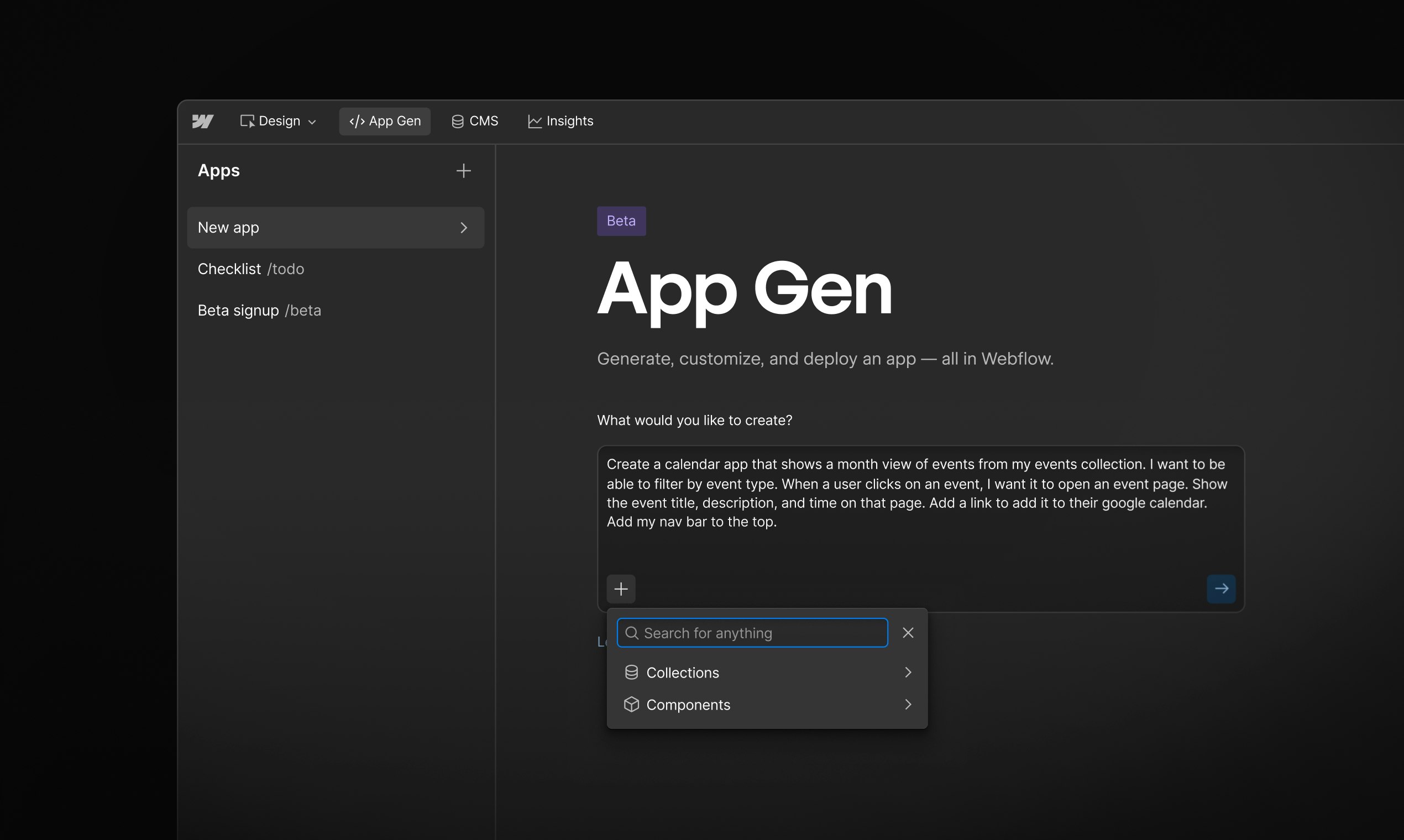
In the evolving landscape of web development, the demand for platforms that seamlessly translate design vision into production applications has intensified significantly. Webflow App Gen, now in public beta (launched November 2025), addresses this critical gap through AI-powered full-stack application generation. Rather than separating design from development, Webflow App Gen enables designers, product managers, and development teams to build complete, production-grade web applications directly within the Webflow visual environment. By leveraging natural language prompts and your existing design system, components, and CMS collections, App Gen generates applications that maintain perfect brand consistency while deploying immediately to Webflow Cloud’s enterprise infrastructure.
Key Features
Webflow App Gen combines AI-powered code generation with native Webflow integration:
- Natural Language to Full-Stack Code: Describe your application requirements in simple language, and App Gen generates complete front-end and back-end code, eliminating the traditional handoff between design and development.
- Design System Integration: The AI automatically applies your site’s typography, colors, layout variables, and existing Webflow components, ensuring every generated app maintains perfect visual and functional consistency with your brand.
- CMS Collection Integration: Generated applications automatically connect to your Webflow CMS collections, enabling dynamic, data-driven experiences like event calendars, job boards, location finders, and pricing calculators without additional configuration.
- Component Reusability Through DevLink: Export React components from your Webflow site directly into generated applications via DevLink, maintaining shared component libraries and ensuring consistent refinement across your entire web presence.
- Production-Grade Deployment: Generated applications deploy immediately to Webflow Cloud, Webflow’s enterprise-grade infrastructure powered by Cloudflare Workers, providing automatic scaling, global CDN performance, and security compliance without additional DevOps overhead.
- Visual Workflow and Real-Time Preview: Maintain complete visibility through integrated editor, terminal, browser preview, and documentation within a unified interface, enabling instant feedback and rapid iteration on generated code.
How It Works
Webflow App Gen operates through an integrated workflow:
Write Your Application Specification: Describe your desired application in natural language—from simple requirements (“Event calendar connected to our CMS”) to complex applications (“Customer dashboard with real-time analytics and role-based access”). The clarity of your description directly influences output quality.
Prompt Processing and Design Analysis: App Gen analyzes your prompt and examines your Webflow site’s design system, existing components, CMS structure, and brand guidelines to understand context.
Full-Stack Code Generation: The AI generates complete application code including front-end UI (automatically styled with your design tokens), back-end logic, database integration, and API connections.
Preview and Refinement: Review the generated application in real-time through the integrated preview environment. Provide feedback or request modifications; App Gen adapts based on your input.
Deploy to Webflow Cloud: Once satisfied, deploy your application with a single click to Webflow Cloud, where it’s hosted alongside your website with automatic scaling, security, and performance optimization.
Use Cases
Webflow App Gen serves diverse development scenarios:
- Designer-Led Development: Web designers can transform Figma or Webflow designs into fully functional applications without requiring JavaScript knowledge or developer handoffs, dramatically compressing design-to-production timelines.
- Rapid Prototyping and Validation: Product managers and startups quickly validate business ideas by generating production-grade prototypes in hours rather than weeks, testing market fit before committing to traditional development.
- Data-Driven Experiences: Build dynamic applications powered by your CMS—event calendars pulling from CMS collections, job boards with filterable listings, location finders, pricing calculators, all automatically connected and maintained.
- Internal Tool Development: Product teams rapidly build internal dashboards, admin panels, and team collaboration tools without writing traditional backend code or managing separate infrastructure.
- Agency Efficiency: Agencies accelerate client delivery by rapidly generating custom applications that maintain perfect brand consistency across client engagements, expanding service offerings without proportionally increasing development capacity.
- E-commerce and Content Marketers: Content-heavy sites extend functionality with AI-generated tools—product recommendation engines, content recommendation systems, user profile dashboards—all drawing from existing CMS data.
Pros & Cons
Advantages
- True Full-Stack Generation: Produces complete applications with front-end UI, back-end logic, and database integration, not just interface components or partial code.
- Brand Consistency by Default: Automatically applies your design system, components, and visual guidelines, eliminating manual styling and ensuring consistency across generated applications.
- Seamless CMS Integration: Generated applications immediately connect to your existing CMS collections, enabling data-driven applications without additional configuration or integration work.
- Enterprise-Grade Infrastructure: Deploys to Webflow Cloud’s infrastructure powered by Cloudflare Workers, providing automatic scaling, global CDN performance, and security compliance built-in.
- Design-to-Code Fidelity: Preserves design intent and visual details through direct translation from your Webflow design environment, maintaining consistency often lost in traditional development handoffs.
- Rapid Iteration: Generate, preview, modify, and redeploy applications in minutes, enabling rapid prototyping and experimentation with minimal friction.
Disadvantages
- Design Quality Dependency: Generated application functionality and appearance depend directly on the quality, completeness, and clarity of your initial Webflow design and prompt specification.
- Post-Export Refinement May Be Required: While production-ready, some applications may require fine-tuning, custom business logic adjustments, or specialized integrations beyond standard CMS connections.
- Currently Public Beta: As a relatively new feature (public beta as of November 2025), the platform continues evolving; certain advanced features and integrations remain in development.
- Webflow Ecosystem Dependency: Full advantages require existing investment in Webflow as your design platform; teams using other design tools (Figma-only without Webflow integration) experience reduced benefit from design system reuse.
How Does It Compare?
Webflow App Gen occupies a distinctive position within the application development landscape, particularly for teams already invested in design-first workflows. Understanding its positioning requires acknowledging fundamentally different architectural approaches among competitors.
Softr specializes in no-code application generation from databases, emphasizing rapid internal tool creation from existing data sources without requiring design as a prerequisite. While Softr generates applications quickly, it begins from database structure; Webflow App Gen begins from design. Softr excels for data-heavy internal applications; Webflow App Gen emphasizes design-driven brand experiences. Softr’s primary audience consists of technical teams with data sources seeking rapid internal tooling; Webflow App Gen targets design-first organizations and agencies.
Retool functions as a low-code internal tool builder emphasizing component customization and developer flexibility. Retool is fundamentally developer-centric, requiring JavaScript and Python capabilities for advanced functionality, and focuses on admin panels and internal dashboards. Retool serves technical teams building sophisticated internal tooling; Webflow App Gen serves designers and product teams building customer-facing applications. Retool prioritizes developer customization; Webflow App Gen prioritizes design preservation and rapid non-technical generation.
OutSystems represents enterprise-scale low-code development with extensive customization, on-premise deployment, and complex DevOps infrastructure. OutSystems demands substantial implementation investment (starting $1,513+/month) and targets large enterprises modernizing legacy systems. OutSystems serves organizations with complex governance, compliance, and infrastructure requirements; Webflow App Gen serves small-to-mid-market teams and agencies requiring rapid deployment without infrastructure complexity.
GitHub Copilot and Claude Agent Mode provide AI-assisted code generation at the line-of-code level, enhancing developer productivity through intelligent completion and multi-step task handling. These remain fundamentally developer-centric tools requiring coding expertise; they don’t translate design into complete applications.
Webflow App Gen’s distinctive positioning emerges through: design-first methodology (beginning from visual assets rather than databases or blank slate code), automatic brand consistency (applying your design system without manual configuration), integrated deployment infrastructure (no separate DevOps or hosting complexity), and rapid non-technical generation (accessible to designers and product managers without developer involvement). While competitors excel in specific dimensions (Softr’s data flexibility, Retool’s developer control, OutSystems’ enterprise scale), no competitor combines design-driven generation, automatic brand consistency, and unified deployment infrastructure in the same way.
Final Thoughts
Webflow App Gen represents a meaningful evolution in web application development by extending Webflow’s design-to-code capability from websites into full-stack applications. Its combination of natural language generation, automatic design system integration, CMS connectivity, and enterprise-grade deployment infrastructure creates genuine efficiency gains for design-driven organizations and agencies.
For design teams, product managers, and agencies whose workflows begin with Figma or Webflow designs, App Gen delivers a compelling value proposition—transforming design assets into deployed applications in hours rather than weeks. The one-click deployment to Webflow Cloud eliminates traditional DevOps complexity while the automatic design system application ensures brand consistency.
However, teams requiring deep technical customization, complex business logic, or infrastructure control may find traditional development, low-code platforms (Retool, OutSystems), or data-first generators (Softr) more appropriate. Webflow App Gen’s strength lies specifically in design-driven, brand-consistent application generation rather than comprehensive technical flexibility or data-source-first development.