Table of Contents
Overview
Transcribe videos, podcasts, meetings, and voice memos with the fastest, most accurate AI models—running locally on your Mac or in the cloud with your own API keys. Whisper Snapper is a native macOS transcription application that offers flexibility between offline privacy and cloud-based speed. The app provides speaker labels, timestamps, and export capabilities to SRT, Markdown, PDF, VTT, CSV, and plain text formats. Available with a free forever tier or one-time \$9.99 Pro upgrade with lifetime access and no subscription fees.
Key Features
Local AI Engines for Offline Privacy: Run WhisperKit and Parakeet models entirely on your Mac without internet connectivity. Your audio files never leave your device, making this ideal for sensitive recordings like confidential interviews, legal depositions, medical consultations, or proprietary business meetings.
Cloud Engines for Maximum Speed: Connect your own OpenAI Whisper, GPT-4o, or Deepgram API keys to leverage cloud processing for faster transcription and advanced features. You maintain control over your API usage and costs while accessing state-of-the-art speech recognition capabilities.
Speaker Identification and Diarization: Automatically detect and label different speakers in multi-person recordings. Speaker diarization is available through Deepgram, GPT-4o Transcribe, and Parakeet v3, making it simple to distinguish who said what in conversations, interviews, and panel discussions.
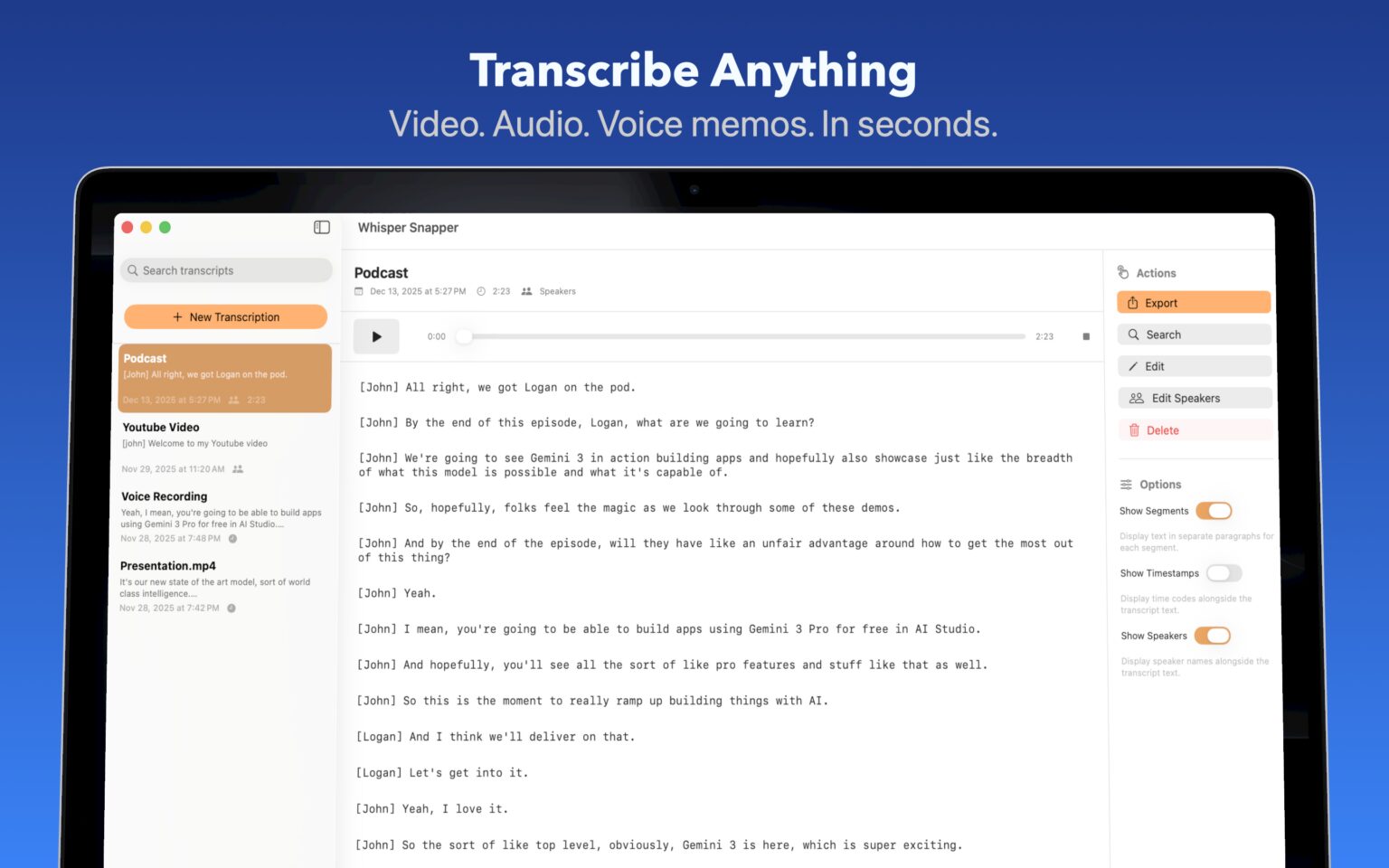
Timestamps and Editable Transcripts: Every transcript includes precise timestamps synchronized with the audio, allowing you to navigate directly to specific moments. Edit the transcribed text inline, search through content, and make corrections as needed.
Comprehensive Export Formats: Export completed transcripts in multiple formats to fit your workflow. Options include plain text (TXT), SubRip Subtitle (SRT), WebVTT (VTT) for video captioning, Markdown for documentation, CSV for data analysis, and PDF for sharing and archiving.
Built-in Voice Recorder: Capture audio directly within the app without needing external recording software. Record meetings, voice memos, or interviews on the fly and immediately send them to the transcription engine.
AI-Powered Summaries and Translation: Generate concise summaries of hour-long recordings with one click, powered by Llama running entirely on your Mac. Translate transcripts into Spanish, French, German, Japanese, Chinese, and 15+ additional languages with all processing happening locally for complete privacy.
Native macOS Design: Built specifically for Mac using SwiftUI, Whisper Snapper delivers fast, lightweight performance that feels right at home on macOS. The app is optimized for Apple Silicon, using WhisperKit and Parakeet natively without emulation or compatibility layers.
No Account Required: Unlike most transcription services, Whisper Snapper works immediately after installation with no account creation, email verification, or login process. Simply drag a file and start transcribing.
How It Works
Drag and drop any audio or video file into the Whisper Snapper app, or use the built-in recorder to capture live audio. Supported formats include MP4, MOV, M4A, MP3, and WAV files. Choose between local AI engines (WhisperKit, Parakeet) for offline privacy or cloud engines (OpenAI Whisper, GPT-4o, Deepgram) for faster processing and advanced features. Cloud options require you to supply your own API keys, which you can obtain from the respective service providers.
Watch the transcript appear in real-time with timestamps and speaker labels when using supported models. Edit the text directly in the app, use the search function to find specific phrases or quotes, and navigate to exact moments by clicking timestamps. Once satisfied with the transcript, export in your preferred format—whether that’s SRT subtitles for video editing, Markdown for documentation, PDF for sharing, or CSV for data analysis.
For AI summaries or translation, select the completed transcript and choose the desired function. Llama processes these requests locally on your Mac, ensuring your content never leaves your device during enhancement operations.
Use Cases
Podcasters Transcribing Episodes for Show Notes: Generate complete episode transcripts with speaker labels to identify different hosts and guests. Export SRT subtitles directly to video editors like Final Cut Pro, Adobe Premiere, or DaVinci Resolve. Transform transcripts into blog posts, social media clips, and searchable show notes to increase discoverability and accessibility.
Students Transcribing Lectures and Meetings: Record classroom lectures and receive instant transcripts for studying and review. Summarize lengthy seminars and academic presentations into key takeaways and main concepts. Translate course materials and international lectures into your preferred language for multilingual classrooms.
Journalists Transcribing Interviews: Transcribe interviews without uploading sensitive sources to third-party cloud services, protecting confidential communications and source anonymity. Search transcripts instantly to find exact quotes and verify statements. Export to Markdown format for easy integration into content management systems and publishing workflows.
Legal and Medical Professionals Needing Secure Transcription: Keep client conversations and patient consultations private with 100% local processing that meets data sovereignty and compliance requirements. Generate speaker-labeled transcripts for depositions, consultations, and case documentation. Maintain complete control over sensitive information without third-party data sharing or cloud storage concerns.
Remote Teams Generating Meeting Minutes: Capture team meetings automatically and distribute accurate transcripts to participants. Share summaries with teammates who couldn’t attend, ensuring everyone stays informed. Translate communications for global teams working across multiple languages and time zones.
Content Creators and Accessibility Advocates: Create accurate captions and subtitles for video content to reach hearing-impaired audiences and improve accessibility. Practice language pronunciation by comparing audio recordings to written transcripts. Translate podcasts, videos, and audio content to expand audience reach internationally.
Pros and Cons
Advantages
One-Time \$9.99 Pro Purchase with No Subscription Fees: Unlike competing transcription services that charge monthly or annual subscriptions, Whisper Snapper offers lifetime Pro access for a single \$9.99 payment. This represents significant long-term savings compared to services costing \$120-180 annually, making professional transcription accessible to students, freelancers, and budget-conscious users.
Flexible Local or Cloud Processing: Choose between offline local models for maximum privacy or cloud APIs for enhanced speed and features on a per-transcription basis. This hybrid approach provides unmatched flexibility—sensitive recordings stay local while routine transcriptions can leverage faster cloud processing when convenient.
Comprehensive Language and Format Support: Transcribe audio in 20+ languages with translation capabilities powered by local AI models. Export to six different formats (TXT, SRT, VTT, Markdown, CSV, PDF) to integrate seamlessly with video editors, documentation systems, content management platforms, and data analysis tools.
Native Apple Silicon Performance: Built specifically for Mac using SwiftUI and optimized for Apple Silicon M-series chips, Whisper Snapper delivers fast, energy-efficient transcription without emulation overhead. Local models run efficiently on device, maximizing battery life during mobile transcription workflows.
Privacy-First Architecture: Local processing options ensure sensitive recordings never leave your Mac. No account creation, email verification, or cloud synchronization means your audio files and transcripts remain completely under your control. This design satisfies strict data sovereignty requirements for regulated industries and confidential communications.
Disadvantages
Mac Platform Exclusivity: Whisper Snapper runs exclusively on macOS with no Windows or Linux versions available. Organizations with mixed-platform teams or Windows-dominant environments cannot use this tool, limiting cross-platform collaboration opportunities.
Cloud Processing Requires User-Supplied API Keys: While local models work immediately, cloud transcription requires obtaining API keys from OpenAI or Deepgram and managing separate billing relationships. Users incur usage-based costs from these providers beyond the \$9.99 app purchase, which may add complexity for non-technical users unfamiliar with API key management.
Separate Cloud Usage Costs: The one-time \$9.99 Pro purchase covers the application but not cloud transcription expenses. OpenAI Whisper API costs approximately \$0.006 per minute, while Deepgram pricing varies by model. High-volume users processing dozens of hours monthly should calculate expected API costs when comparing total cost of ownership against subscription-based competitors with inclusive transcription limits.
Limited Advanced Features Compared to Enterprise Solutions: While Whisper Snapper excels at core transcription, it lacks advanced workflow automation, team collaboration tools, custom vocabulary training, and enterprise integrations found in professional platforms like Otter.ai Enterprise or Descript. Organizations requiring centralized billing, admin controls, or CRM integrations should consider more comprehensive platforms.
Pricing
Free Forever Tier: Available permanently with core transcription features including local and cloud model support, multiple export formats, timestamps, and basic editing capabilities. No credit card required, no trial limitations, and no forced upgrades.
Pro Upgrade: One-time \$9.99 payment for lifetime access to all Pro features with no recurring subscription fees. Pro features include enhanced AI capabilities, priority processing, advanced export options, and unlimited transcription length. This represents exceptional value compared to subscription-based competitors charging \$100-200+ annually.
Cloud Engine Costs: When using cloud transcription options, users pay API usage fees directly to providers. OpenAI Whisper API costs approximately \$0.006 per minute (\$0.36 per hour). Deepgram pricing varies by model and volume, typically ranging from \$0.0043-0.0125 per minute. These costs are separate from the Whisper Snapper app purchase and billed directly by the respective cloud providers.
How Does It Compare?
Whisper Snapper positions itself uniquely in the 2025 Mac transcription landscape through its one-time purchase model and hybrid local/cloud architecture. Here’s how it compares to major competitors:
vs. MacWhisper
Pricing: MacWhisper Pro currently costs €49 (\$49-69 USD depending on exchange rate) for lifetime license, significantly higher than Whisper Snapper’s \$9.99. MacWhisper was originally priced at €6-15 in early 2023 but increased to €39 in 2024 and €49 in late 2024/2025 following major updates. Student discounts bring MacWhisper to approximately €24.50 with special discount codes.
Features: MacWhisper offers more advanced features including batch transcription, system audio recording, YouTube video transcription, and extensive integrations with Notion, Zapier, n8n, webhooks, and Obsidian. It supports ChatGPT and Claude integration for AI-powered prompting, custom GGML model support, and watch folder automation.
Models: Both apps support Whisper models, WhisperKit, and Parakeet. MacWhisper adds Parakeet v2 (claiming 300x realtime transcription), distilled models, and more cloud options including ElevenLabs, Groq, Ollama, XAi, Deepseek, and custom OpenAI endpoints.
Platform: MacWhisper is available on Mac (via Mac App Store as “Whisper Transcription” or direct via Gumroad as “MacWhisper”), iOS, and iPad. Whisper Snapper is currently Mac-only.
Best For: Whisper Snapper suits budget-conscious users needing reliable transcription without advanced workflow automation. MacWhisper targets power users requiring batch processing, YouTube transcription, extensive integrations, and cross-platform sync.
vs. Wispr Flow
Pricing: Wispr Flow operates on subscription model with Free tier (2,000 words/week), Pro at \$15/month (\$12/month annually, totaling \$144/year), Teams at \$12/user/month (\$10/user/month annually), and custom Enterprise pricing. Whisper Snapper’s one-time \$9.99 delivers lifetime value equivalent to approximately one month of Wispr Flow Pro.
Deployment: Wispr Flow runs entirely in the cloud with no offline mode, while Whisper Snapper offers 100% local processing options via WhisperKit and Parakeet models. This represents a fundamental architectural difference favoring privacy-conscious users.
Focus: Wispr Flow emphasizes real-time voice dictation for typing anywhere on your system with Command Mode for AI-powered editing. Whisper Snapper focuses on transcribing existing audio/video files with comprehensive export options.
Best For: Wispr Flow excels for users primarily needing fast dictation to write emails, documents, and code across applications. Whisper Snapper is optimal for transcribing recorded content like podcasts, meetings, interviews, and lectures.
vs. Whisper Notes
Pricing: Whisper Notes costs \$4.99 one-time purchase (includes both Mac and iOS), making it even more affordable than Whisper Snapper. However, Whisper Snapper offers broader features beyond dictation.
Focus: Whisper Notes specializes in system-wide Fn-key dictation for real-time typing anywhere on Mac. Whisper Snapper provides comprehensive file-based transcription with speaker labels, timestamps, multiple export formats, and built-in recorder.
Model: Whisper Notes uses Whisper Large-v3 Turbo exclusively. Whisper Snapper supports multiple models including WhisperKit, Parakeet, and cloud options.
Best For: Whisper Notes suits users primarily needing fast dictation replacement for Apple’s built-in dictation. Whisper Snapper serves users transcribing recorded audio/video files who need structured output with timestamps and speaker identification.
vs. Otter.ai
Pricing: Otter.ai offers free tier with limited monthly transcription; paid plans start at \$8.33/month (\$100/year). Whisper Snapper’s one-time \$9.99 is cheaper than one month of Otter.ai Pro.
Features: Otter.ai specializes in live meeting transcription with real-time collaboration, automated meeting summaries, action item extraction, and integrations with Zoom, Google Meet, and Microsoft Teams. Otter.ai provides cloud-based team collaboration features Whisper Snapper lacks.
Language: Otter.ai supports English only. Whisper Snapper handles 20+ languages.
Privacy: Otter.ai operates entirely in cloud, while Whisper Snapper offers local processing.
Best For: Otter.ai excels for teams requiring live meeting transcription with real-time collaboration and CRM integrations. Whisper Snapper suits individuals prioritizing privacy, multilingual support, and one-time purchase economics.
vs. Descript
Pricing: Descript costs \$12 per editor per month with free tier available. Annual cost reaches \$144 compared to Whisper Snapper’s one-time \$9.99.
Features: Descript combines transcription with professional video editing, overdub voice synthesis, filler word removal, and multi-track audio editing. It’s a comprehensive content creation platform beyond pure transcription.
Languages: Descript supports 22 languages compared to Whisper Snapper’s 20+.
Best For: Descript targets video creators and podcasters needing integrated editing workflows. Whisper Snapper focuses on straightforward transcription for users not requiring video editing capabilities.
vs. Notta
Pricing: Notta Pro starts at \$14.99/user/month (\$180 annually), making it 18x more expensive annually than Whisper Snapper’s one-time cost.
Features: Notta emphasizes live transcription with real-time collaboration, automated meeting scheduling, template management, and team workspaces.
Accuracy: Notta claims 98.86% accuracy across 58 languages, among the highest in the industry.
Best For: Notta suits teams requiring live meeting intelligence and collaborative features. Whisper Snapper serves individual users prioritizing cost efficiency and privacy.
vs. Sonix
Pricing: Sonix starts at \$22/month (\$264 annually), representing 26x Whisper Snapper’s cost over a year.
Features: Sonix offers automated subtitles, custom dictionaries, multi-user collaboration, and extensive third-party integrations with Adobe Premiere, Final Cut Pro, and Avid Media Composer.
Languages: Sonix supports 38 languages with 97% accuracy.
Best For: Sonix targets professional video production teams. Whisper Snapper serves budget-conscious individual creators.
vs. Trint and Rev
Trint: Starts at \$48-78/month with 99% accuracy across 31 transcription languages, targeting professional media organizations and research institutions.
Rev: Charges \$1.50 per minute (\$90 per hour) with human transcription options, focusing on absolute accuracy for legal and medical fields.
Best For: These premium services suit organizations requiring maximum accuracy and human verification. Whisper Snapper delivers strong AI transcription at dramatically lower cost for general-purpose needs.
Key Differentiators
Whisper Snapper distinguishes itself through exceptional pricing (one-time \$9.99 vs subscription competitors), flexible architecture (local or cloud processing per transcription), privacy-first design (100% offline capable), and native Apple Silicon optimization. It occupies a sweet spot between feature-rich enterprise platforms and basic consumer tools—delivering professional-grade transcription with speaker labels, timestamps, and comprehensive export options at an entry-level price point that eliminates long-term subscription burden.
Final Thoughts
Whisper Snapper represents a compelling value proposition in the Mac transcription software market. The one-time \$9.99 Pro purchase eliminates subscription fatigue while delivering professional features including speaker identification, timestamps, multiple export formats, and AI-powered summaries. The hybrid local/cloud architecture uniquely addresses both privacy concerns and performance requirements, allowing users to choose the appropriate processing method for each transcription task.
Native macOS design with Apple Silicon optimization ensures fast, energy-efficient performance without the overhead of cross-platform compatibility layers. The ability to run entirely offline using WhisperKit and Parakeet models satisfies strict data sovereignty requirements for legal professionals, medical practitioners, journalists protecting confidential sources, and organizations subject to regulatory compliance mandates.
However, potential users should consider limitations. The Mac-only platform excludes Windows and Linux users, preventing cross-platform team adoption. Cloud transcription requires managing separate API keys and billing relationships with OpenAI or Deepgram, adding complexity beyond the simple app purchase. Organizations requiring advanced features like batch processing automation, YouTube transcription, extensive third-party integrations, or team collaboration tools should evaluate MacWhisper or enterprise-focused alternatives like Otter.ai Enterprise or Descript.
For individual Mac users—podcasters creating show notes, students transcribing lectures, journalists processing interviews, content creators generating subtitles, or remote workers capturing meeting minutes—Whisper Snapper delivers exceptional value. The free forever tier allows unlimited evaluation without trial limitations, while the \$9.99 Pro upgrade provides lifetime access at a fraction of annual costs for subscription competitors.
As the transcription software landscape continues evolving with improved AI models and expanding language support, Whisper Snapper’s one-time purchase model and privacy-first architecture position it as a sustainable long-term solution for Mac users seeking reliable, affordable transcription without ongoing subscription commitments.