Table of Contents
Xcode 26.3
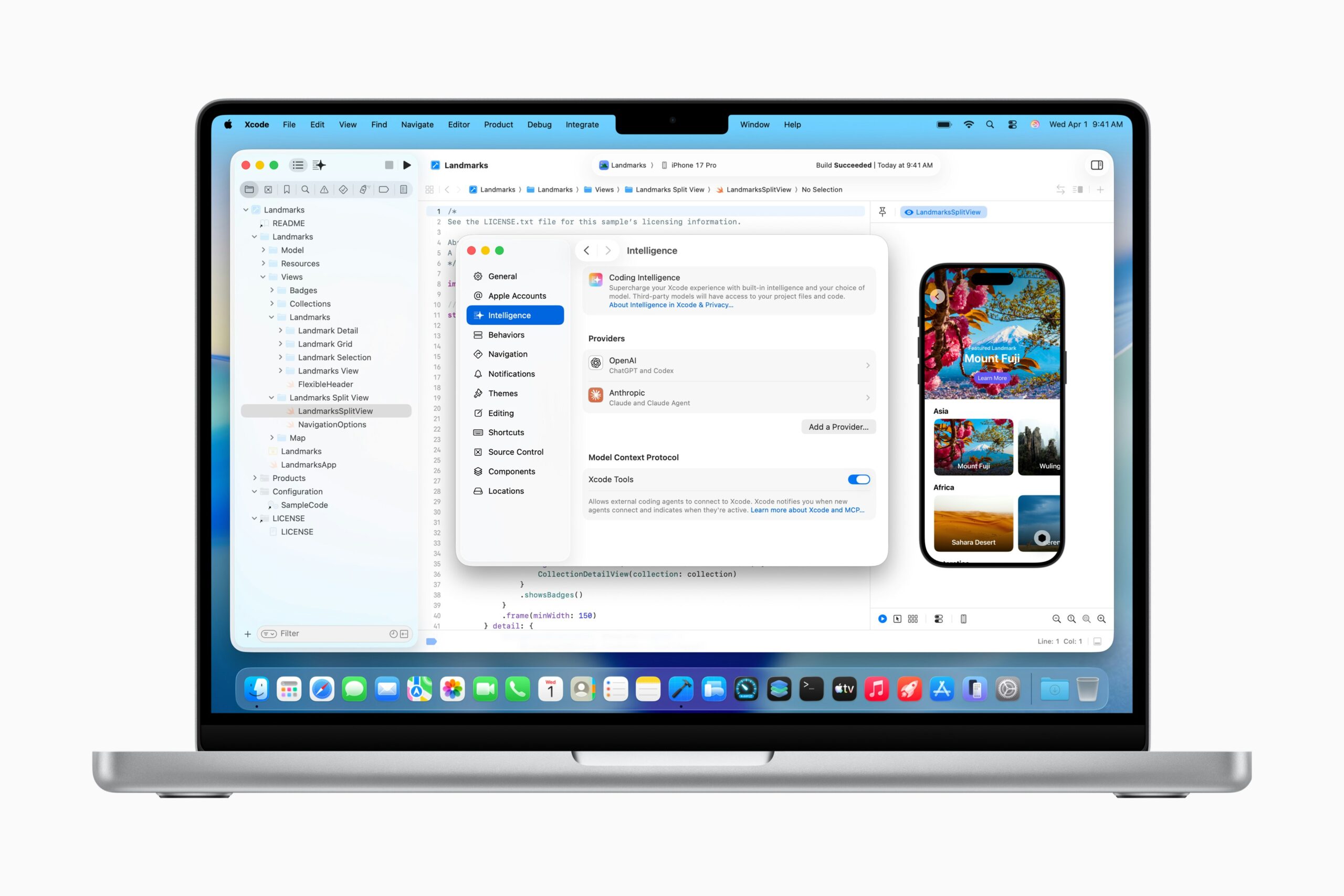
Xcode 26.3 introduces support for agentic coding, a transformative workflow that allows developers to build apps using advanced coding agents powered by Anthropic’s Claude and OpenAI’s reasoning models. With this update, Xcode shifts from passive assistance to active collaboration, working with greater autonomy to achieve high-level developer goals—from breaking down complex architectures to executing multi-step refactoring tasks using built-in tools.
Key Features
- Agentic coding with autonomous collaboration: Direct integration with AI agents that can plan and execute tasks independently.
- Native MCP protocol support: Seamless connectivity with Anthropic’s Claude and OpenAI models via the Model Context Protocol (MCP), enabling extensible tool use.
- Full development lifecycle autonomy: Agents can search documentation, explore file structures, update project settings, and perform visual verification without constant hand-holding.
- Iterative visual debugging: Agents can capture and analyze Xcode Previews to self-correct UI implementations.
- Autonomous task breakdown: AI proactively deconstructs high-level prompts into actionable steps based on your specific project architecture.
- Enhanced Swift coding assistant: Powered by the unified intelligence of Xcode 26 and Apple Intelligence.
- Project management: Agents handle build configurations, test execution, and setting updates.
- Multi-agent coordination: Orchestrates complex workflows involving multiple specialized AI models.
- Deep macOS 26 integration: Optimized for the latest Apple Silicon and macOS 26 (Tahoe) features.
How It Works
Developers install Xcode 26.3 on macOS 26 with Apple Intelligence enabled. After authenticating their Anthropic or OpenAI accounts via the integrated MCP settings, they can invoke agentic coding by describing high-level objectives. AI agents autonomously break down the work, navigate the project hierarchy, search relevant Apple documentation, write and refactor code, and run tests. Crucially, agents can capture Xcode Previews to visually verify their work and iterate on fixes. Developers maintain a supervisory role, approving critical actions while the agents handle the implementation details with significantly greater autonomy than traditional autocomplete tools.
Use Cases
- iOS and macOS app development: End-to-end feature implementation with AI assistance.
- Complex refactoring: Safely restructuring multi-file architectures with context-aware agents.
- Rapid prototyping: Turning high-level ideas into functional Apple platform apps quickly.
- Documentation-driven development: Agents autonomously find and apply the latest API changes.
- Visual UI iteration: Refining interfaces based on visual feedback loops in Previews.
- Swift codebase modernization: Updating legacy code to modern Swift concurrency and syntax.
- Team productivity: Offloading boilerplate and testing tasks to autonomous agents.
Pros and Cons
- Pros: Native integration with the Apple IDE and toolchain; First-party support for Apple Intelligence; MCP protocol flexibility (Claude, OpenAI, and others); Visual verification capabilities via Previews; Deep context awareness of project settings and build systems.
- Cons: Requires macOS 26 and compatible hardware; Platform-locked to the Apple ecosystem; Separate API costs for third-party agents (Anthropic/OpenAI); “Release Candidate” status implies potential stability issues; Learning curve for effective agent supervision; Heavy reliance on internet connectivity for cloud-based reasoning.
Pricing
- Xcode: Free with an Apple Developer account.
- macOS 26 & Apple Intelligence: Included with compatible Mac hardware.
- Coding Agents: Requires separate subscriptions or API keys for providers like Anthropic (Claude) and OpenAI. Total cost varies based on token usage and agent interaction volume.
How Does It Compare?
Xcode 26.3 competes directly with advanced AI-native editors and agentic extensions. Here is how it stacks up against key competitors:
- Cursor: The market leader in AI-native editing. Cursor’s “Composer” feature offers a highly fluid, multi-file editing experience that feels faster for general web/software dev. However, Xcode 26.3 distinguishes itself with deep knowledge of Apple’s proprietary build system (.xcodeproj), schemes, and visual previews, which Cursor often struggles to manipulate correctly.
- GitHub Copilot Workspace: Excellent for task-centric workflows starting from issues and pull requests. While Copilot Workspace excels at planning, Xcode’s agents have better access to the runtime environment (Previews, Simulators) for verifying that the code actually works visually.
- Windsurf (formerly Codeium): Known for its “Flows” and deep context awareness (“Cascades”). Windsurf offers a strong cross-platform alternative, but Xcode 26.3 provides superior integration with Apple’s latest APIs and documentation, which are often delayed in third-party tools.
- Replit Agent: Focused on “zero-to-app” rapid prototyping in the browser. Xcode offers a professional, local development environment suitable for complex, production-grade native apps that Replit cannot handle.
- JetBrains AI: Integrated into AppCode/IntelliJ. While powerful for refactoring, it lacks the deep, native OS-level integration of Apple Intelligence and the visual debugging loops unique to Xcode’s agent implementation.
Final Thoughts
Xcode 26.3 represents Apple’s definitive entry into the agentic coding era. By adopting the MCP protocol, Apple has surprisingly opened its walled garden to best-in-class models from Anthropic and OpenAI, addressing the long-standing complaint of Xcode’s “dumbness” compared to AI editors like Cursor. While it requires the latest hardware (macOS 26) and external API subscriptions, the ability for an agent to not just write code but visually verify it in Xcode Previews is a game-changer for mobile development. For dedicated iOS/macOS engineers, this update likely eliminates the need to context-switch between Cursor and Xcode, finally bringing a modern, autonomous workflow directly into the native IDE.