Table of Contents
Overview
In a world where digital workflows are scattered across countless disconnected applications and services, the dream of a truly unified, intelligent workspace has felt frustratingly out of reach. Imagine a personal cloud computer that not only stores your files and connects your tools but also leverages the power of AI to work autonomously on your behalf, integrating all your context to execute complex tasks. Zo Computer, launched on Product Hunt in November 2025, aims to turn that vision into practical reality through purpose-built infrastructure. It offers unified environment where you can build powerful personal software, host applications and services directly on your own cloud server, and command AI to perform research, automate workflows, or build custom applications—all while maintaining complete ownership of your data with full rights to download and migrate everything you create at any time. It’s your personal corner of the cloud, supercharged with artificial intelligence and genuinely intelligent orchestration rather than superficial AI features bolted onto existing platforms.
Key Features
Zo Computer delivers comprehensive personal cloud infrastructure combining file storage, application hosting, AI agents, and automation capabilities through unified, context-aware platform.
Persistent Personal Server with Root Access: You receive dedicated cloud computer running on your personal server with complete root-level access, enabling installation, configuration, and execution of anything you need exactly like owning physical machine but with cloud infrastructure benefits including elastic scaling, professional uptime guarantees, and data center reliability without managing hardware directly.
Model-Agnostic AI Architecture: Avoid lock-in to single AI provider ecosystem through support for leading models including OpenAI (GPT-4, GPT-4o), Anthropic Claude, Google Gemini, and others. Switch between models based on task requirements, cost optimization, or performance characteristics without migrating your data or rebuilding workflows—AI as commodity utility rather than platform differentiator.
Unified Workspace with Full Context: Central hub integrating files (documents, databases, code), applications, connected tools (Gmail, Notion, Linear, Airtable, Google Calendar, Dropbox, Spotify, Slack), and AI capabilities into single cohesive environment. AI maintains complete contextual awareness of all your resources enabling sophisticated task execution, cross-tool automations, and decisions based on comprehensive personal information rather than isolated data silos.
File and Application Hosting with Custom Deployment: Host anything directly on your Zo server—personal projects, professional applications, websites, blogs, databases, APIs, self-hosted services (n8n instances, Plex servers, etc.)—without separate hosting providers, deployment complexity, or vendor management overhead. Development environment doubles as runtime environment eliminating traditional deployment friction.
Advanced Automation Through Natural Language: Connect tools through intuitive natural language commands enabling AI to build workflows automating repetitive tasks. Triggers can be manual (on-demand), scheduled (recurring), or event-based (email arrival, calendar event, webhook). Complex multi-step workflows executable through simple conversational instructions without requiring programming expertise or workflow builder configuration.
Automatic Integration Building for Unsupported Tools: If Zo doesn’t natively support specific application, request AI to build integration automatically. Zo autonomously researches API documentation, writes connector code, guides authentication setup, and creates integration without requiring technical expertise from you—democratizing integrations beyond pre-built connectors.
Daily Snapshots with Time-Travel: Automatic daily system snapshots enable time-travel through previous versions of your entire Zo computer state. Recover from AI mistakes, accidental deletions, or system errors by restoring previous snapshots without permanent data loss—critical safety feature given AI autonomy.
Multi-Modal AI Capabilities: Beyond language models, Zo includes built-in support for transcription (audio-to-text conversion), image generation (DALL-E, Midjourney integrations), and video generation capabilities enabling sophisticated multimedia content creation directly within unified workspace.
Web Access and Research: Zo’s AI agent can browse web, search for information, and incorporate current data into responses and automations—critical capability for research, market analysis, competitive intelligence, and real-time decision-making impossible with knowledge-cutoff-limited language models.
Custom API Endpoints and Webhooks: Build custom APIs on your Zo server enabling integrations from external services triggering automations, receiving webhook notifications, or programmatically accessing your personal data without complex infrastructure management.
Multiple Interaction Methods: Access Zo through browser web interface, native macOS application, direct chat interface, email (send emails to your Zo email address triggering commands), or text message (SMS to your Zo number)—unprecedented accessibility enabling voice-first, mobile-first, or email-first workflows.
Collaborative Features with Data Privacy: Share specific projects, files, or automated results with collaborators while maintaining full privacy control. Collaborators can view results without accessing entire Zo computer state—fine-grained permissions enable teamwork without exposing sensitive personal data.
Pricing
Zo Computer operates on tiered subscription model with transparent pricing based on computational resources and storage requirements.
Free Tier: \$0/month. Limited AI requests (50-100 monthly), basic storage (10GB), connection to core integrations, and access to community support—appropriate for individual experimentation and light usage evaluation.
Starter Plan: Pricing tier for solo creators and small teams typically includes significantly higher AI request allocation (500+ monthly), expanded storage (128GB), priority integrations, and community support.
Pro Plan: Mid-market tier typically including unlimited AI requests, substantial storage (512GB), fastest processing speeds, priority support with response SLA guarantees, and ability to host multiple applications simultaneously.
Scale Plan: Enterprise tier with custom quotas, dedicated infrastructure options, white-label capabilities, advanced security controls, audit logging, and direct engineering support for mission-critical deployments.
Usage-Based Pricing Components: Beyond base subscription, potential variable costs include storage overages beyond tier allocations, computing power consumption during intensive AI operations or application hosting, network egress (data transfer out), and premium AI model usage beyond standard allocations.
Note: Specific pricing details require direct inquiry through zo.computer as full tier structure and costs not publicly disclosed. Organizations should verify current pricing, storage limits per tier, AI request quotas, support SLA levels, and available discounts before commitment.
How It Works
Zo Computer’s operational workflow emphasizes simplicity and unified context through three core phases: Connect, Create, Deploy.
Users begin by creating Zo account provisioning their dedicated personal server deployed within secure data center infrastructure with automatic daily snapshots and backups.
Connection phase: Users connect essential tools and data sources through built-in integrations (Gmail, Notion, Linear, Airtable, Google Calendar, Dropbox, Spotify, etc.) or custom connectors built by AI. Each connection grants Zo contextual awareness—access to files, conversations, project status, schedules—enabling sophisticated decision-making and automation.
File upload and organization: Users upload documents, databases, code repositories, and files organizing them within Zo’s file system. Files remain under complete user control always downloadable and migrable without vendor lock-in or enforced data retention.
Creation phase: Users interact with Zo through any supported interface (chat, email, SMS, macOS app, or web) requesting tasks in natural language. “Analyze my research papers and suggest connections” or “Create a dashboard tracking my calendar and todo list” or “Build a website for my portfolio” all execute through conversational instructions.
AI execution: Zo’s AI agent reads uploaded context, accesses connected tools, browses web for external information, and executes requested tasks. For complex requests, AI may ask clarifying questions, request permissions before accessing specific data, or present options for refined execution.
Creation and hosting: Whether building automations, generating content, or developing applications, everything runs directly on your Zo server. Websites, APIs, databases all hosted natively without separate infrastructure—unified deployment model.
Result delivery and refinement: Completed tasks surfaced through multiple channels (chat result, email notification, SMS alert, or dashboard display). Users review outputs, provide feedback requesting modifications, and iterate until satisfied.
Deployment phase: Completed automations can be scheduled (recur daily, weekly, monthly), triggered by events (email arrival, calendar event, webhook), or executed on-demand. Applications and websites immediately accessible through web links or custom domains.
The entire workflow from setup through production automation typically completes in hours versus traditional weeks or months required for custom infrastructure, integrations, and automation platform setup.
Use Cases
Zo Computer serves diverse personal and professional scenarios where unified workspace, AI autonomy, and custom automation drive exceptional value.
AI-Driven Research and Analysis: Consolidate research materials, notes, data sources, saved articles, and databases in Zo’s unified workspace. Request AI to analyze information, identify patterns, find connections across sources, synthesize findings into comprehensive reports, and maintain organized research notes—dramatically accelerating research velocity.
Personal and Professional Application Hosting: Host anything from personal blog or portfolio to complex web applications, without managing separate hosting infrastructure. Deploy projects directly on your server with zero deployment configuration—development environment equals runtime environment.
Intelligent Workflow Automation: Create sophisticated multi-step automations triggered by events, schedules, or manual commands. Examples include: daily email digest consolidating project updates, weekly status reports automatically compiled from multiple sources, expense tracking across different tools, lead nurturing workflows, or client communication automation.
Custom AI-Powered Workspace: Build digital environment specifically tailored to your needs integrating most-used tools, personal data, and custom workflows. Unlike generic SaaS applications requiring adaptation to their constraints, Zo adapts to your requirements.
Developer and Sandbox Environment: Use cloud computer as isolated environment for developing, testing, and deploying software without affecting local machine. Perfect for experimentation, learning new frameworks, or production work requiring reliability and uptime guarantees.
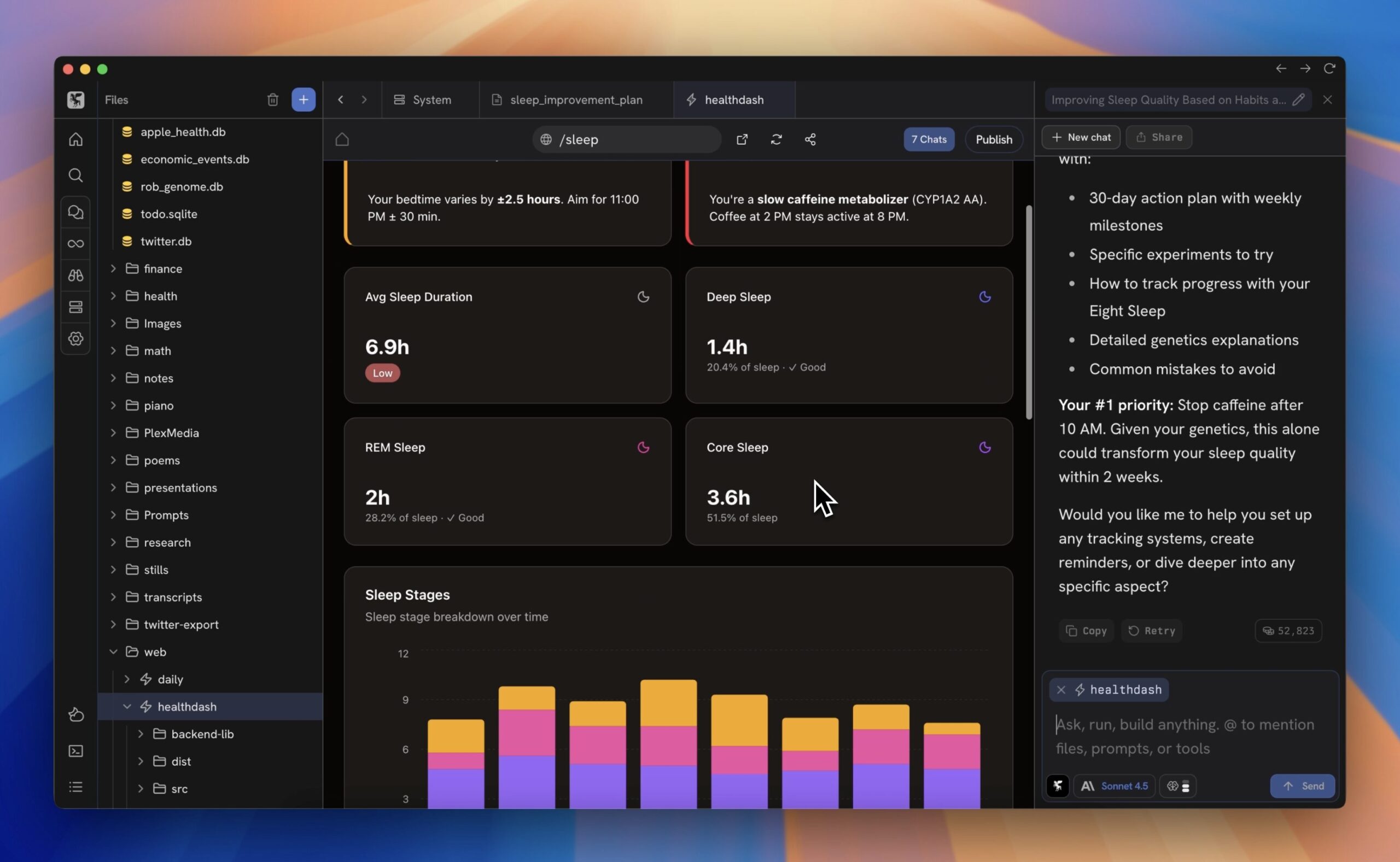
Personal Health and Wellness Tracking: Consolidate health data (fitness apps, health records, sleep tracking, nutrition logs) enabling AI to analyze patterns, provide personalized recommendations, and flag concerning trends. One user built personal health site analyzing genetics enabling sleep optimization based on genomic data.
Autonomous Client and Project Management: Build CRM from scratch combining email, calendar, notes, and task data into unified client view. AI autonomously tracks client communications, flags follow-ups, prepares meeting summaries, and maintains relationship continuity across multiple channels.
Knowledge Management and Personal Wiki: Transform personal notes and research into interactive knowledge base. Ask AI questions about your personal knowledge base enabling sophisticated queries like “What did I learn about X topic?” or “How is Y related to Z?”
Entrepreneurial Launch Support: For solopreneurs and small teams, Zo provides infrastructure for building business tools (internal dashboards, customer databases, automated invoicing, analytics), hosting public-facing applications (website, blog, API), and executing operations (customer communications, report generation) all on personal infrastructure.
Pros and Cons
Understanding both advantages and implementation considerations provides clarity for evaluating Zo Computer’s fit for personal computing, application development, and automation needs.
Advantages
Deep Customization Without Limits: With root access to your own server and model-agnostic AI, customization potential proves nearly limitless. Build exactly environment you envision without compromise, constraint, or forced architectural patterns—complete alignment with personal requirements and preferences.
Complete Data Ownership and Portability: You maintain absolute control of data and everything created. Download projects, export databases, or migrate to alternative infrastructure anytime without lock-in or data hostage scenarios. True digital sovereignty in era of cloud computing and data harvesting.
Unprecedented Flexibility Through AI Autonomy: Model-agnostic approach and unified workspace provide flexibility rarely available in restrictive platforms. Switch AI models, integrate unsupported tools, execute custom workflows, or entirely rebuild architecture—unlimited capability ceiling versus predetermined constraints.
Professional Infrastructure for Personal Use: Leverage enterprise-grade cloud computing infrastructure (data center reliability, automatic failover, scaling, security) without enterprise complexity or costs. Personal server operates with professional uptime guarantees and infrastructure sophistication.
Multi-Channel Access Enabling Any Workflow: Interact through web, mobile app, email, or SMS enabling integration into existing communication patterns. Never context-switch from preferred communication tool—Zo adapts to you rather than forcing tool adoption.
Disadvantages
Early-Stage Platform with Evolving Feature Set: Launched November 2025 means relatively limited production deployment history, undiscovered edge cases through broader adoption, limited third-party integrations and plugins ecosystem compared to mature platforms operating for years. Early adopter carries inherent stability risk and features subject to significant change.
Requires Technical Comfort for Full Potential: While designed for non-technical users through natural language interfaces, unlocking full capabilities—particularly root access, custom deployments, advanced automations, API integrations—benefits from technical comfort with servers, networking, APIs, and infrastructure concepts. Non-technical users may hit learning curve ceiling for advanced use cases.
Resource-Based Scaling Costs: Pricing based on resource consumption (storage, compute, AI requests) means costs scale with usage. Heavy users with intensive AI operations, large file storage, or complex hosting requirements may accumulate significant monthly costs without ceiling visibility—potentially exceeding fixed-price alternatives for high-volume usage.
Support and Community Maturity: As new platform, third-party resources, community-contributed solutions, and support expertise remain limited compared to established cloud platforms. Users may face slower problem resolution and fewer available examples or tutorials.
AI Autonomy Risks: Granting AI root access to server with execution authority creates genuine risks if AI misbehaves, hallucinates instructions, or executes unintended operations. Snapshots provide recovery but don’t eliminate operational risk or potential data corruption during complex automation execution.
Network Dependency: Zo operates as cloud-based system requiring reliable internet connectivity. While cloud infrastructure provides uptime guarantees, internet connectivity loss disrupts access to your computer and requires reliance on offline capabilities or alternative access methods.
How Does It Compare?
The cloud computing, personal infrastructure, and AI automation landscape features diverse solutions ranging from specialized GPU providers to development platforms to automation tools. Understanding Zo Computer’s positioning requires examining specific alternatives across different approaches and target users.
Replit
Replit provides cloud-based development environment specifically optimized for code education, rapid prototyping, and collaborative programming. Features include live multiplayer coding, built-in deployment, 200+ language templates, integrated databases (Replit Database, PostgreSQL), and seamless collaboration. Free tier available; Hacker plan \$7/month; Teams plan requires inquiry. Emphasizes ease-of-use and educational accessibility for learning programming.
Replit and Zo Computer serve different user profiles and scopes. Replit focuses specifically on code development and deployment for learners and hobbyists prioritizing accessibility and rapid iteration. Zo provides comprehensive personal server infrastructure serving broader personal computing needs beyond coding including file storage, application hosting, AI automation, and tool integration.
Replit excels for coding education, quick scripting, and project prototyping with instant sharing capabilities. Zo serves broader personal infrastructure and automation needs where coding is optional. Replit is specialized coding environment; Zo is general-purpose personal computer.
Lambda Labs
Lambda Labs delivers GPU cloud infrastructure specifically optimized for AI/ML workloads including LLM training, deep learning research, and compute-intensive research. Features include bare-metal GPU access, pre-installed ML libraries (Lambda Stack), one-click cluster setup, high-speed networking (InfiniBand), and no egress fees. Pricing starts ~\$2.49/hour for H100 GPUs. Targets AI researchers and teams requiring specialized compute.
Lambda Labs and Zo Computer address completely different workload categories. Lambda Labs specializes in GPU compute for ML training and research. Zo provides general-purpose personal server hosting applications, AI automation, and personal infrastructure. Lambda Labs for GPU-intensive research; Zo for personal computing, AI automation, and application hosting.
Paperspace
Paperspace (now part of DigitalOcean) provides GPU cloud infrastructure with focus on ML development and experimentation. Features include pre-configured templates, version control and reproducibility, flexible scaling, multi-GPU support, and MLOps integration. Pricing varies by GPU type (H100 ~\$2.24/hour, A100 ~\$1.15/hour). Targets ML engineers and data scientists requiring scalable compute.
Paperspace and Zo Computer serve different computational paradigms. Paperspace specializes in GPU acceleration for machine learning and data science workloads. Zo provides general-purpose personal infrastructure including AI integration but without specialized GPU focus. Both can run ML workloads but Paperspace provides purpose-built ML infrastructure while Zo provides personal computing ecosystem.
Google Colab+
Google Colab+ provides cloud-based Jupyter notebook environment with GPU access specifically designed for data science and machine learning education. Features include free tier with GPU access (limited), Colab+ subscription (\$12.99/month) for premium GPUs and extended runtimes, and integration with Google Drive. Emphasizes accessibility and ease-for beginners.
Google Colab and Zo Computer serve different scopes and users. Colab specializes in data science notebooks and experimentation particularly for learning. Zo provides comprehensive personal infrastructure hosting applications, managing files, and executing AI automations beyond notebook-based analysis. Colab for data science experimentation; Zo for personal computing and infrastructure. Colab is notebook-first; Zo is server-first.
DigitalOcean and Linode
DigitalOcean and Linode provide traditional VPS/cloud infrastructure enabling users to rent servers and manage infrastructure through web dashboards. DIY approach requiring manual setup of applications, databases, security, and infrastructure management. Pricing from ~\$5/month for basic droplets. Target technically sophisticated users comfortable with server administration and Linux.
DigitalOcean/Linode and Zo Computer differ fundamentally in abstraction level and AI integration. DIY providers give raw infrastructure requiring manual configuration. Zo provides preconfigured personal infrastructure with built-in AI agent automating setup and management. DIY providers suit operators comfortable with server administration; Zo suits users wanting infrastructure without operational burden. DIY raw control but high complexity; Zo higher-level abstraction with AI assistance.
Zapier and n8n
Zapier and n8n provide workflow automation platforms connecting SaaS applications through trigger-action workflows without coding. Zapier hosted SaaS (\$19-299+/month), n8n self-hosted or cloud (\$0+, various tiers). Enable non-technical users to automate business processes across integrated apps. Limited to application connections—don’t provide hosting, storage, or AI execution context.
Zapier/n8n and Zo Computer serve different automation scopes. Zapier/n8n specialize in connecting third-party SaaS applications through workflows. Zo provides unified workspace incorporating tools plus AI execution plus personal hosting. Zapier for connecting existing tools; Zo for building personal infrastructure integrating tools plus AI plus hosting. Zapier narrow focus on workflows; Zo comprehensive personal computing.
Manus
Manus provides autonomous AI agent platform enabling AI to control computers through user interface access rather than APIs, capable of autonomous workflows and complex multi-step tasks. Emphasizes transparency through recording AI actions. Currently invite-only beta. Positions as autonomous agent assistant rather than personal infrastructure.
Manus and Zo Computer differ in core positioning and architecture. Manus focuses on autonomous agent capabilities executing tasks through UI interaction. Zo focuses on unified personal server infrastructure with integrated AI. Manus agent-first; Zo infrastructure-first. Manus for delegating tasks to autonomous agents; Zo for building personal computing environment AI inhabits.
Anthropic Claude with Document Upload
Anthropic Claude provides conversational AI accessible through web interface or API with ability to upload documents and ask questions about content. Features sophisticated reasoning and long context windows (100K-200K tokens). Free tier available; Claude Pro \$20/month. Targets anyone wanting advanced AI assistant without infrastructure requirements.
Claude and Zo Computer serve fundamentally different engagement models. Claude provides conversational AI without persistent infrastructure, hosting, or automation capabilities. Zo provides infrastructure where AI lives, executes autonomously, and manages your personal computing environment. Claude ephemeral conversation partner; Zo persistent intelligent infrastructure. Claude for queries and analysis; Zo for ongoing automation and personal infrastructure.
Notion with AI Capabilities
Notion provides all-in-one workspace combining documents, databases, wikis, and now AI assistance. Notion AI (\$10/month per user) adds AI writing assistant, summarization, and content generation. Targets teams and individuals using Notion for knowledge management. Limited to Notion interface and data structures.
Notion and Zo Computer serve different organizational and hosting models. Notion all-in-one knowledge workspace with supplementary AI features. Zo personal server infrastructure hosting custom applications and automations. Notion structured workspace; Zo flexible personal computer. Notion for team documentation and knowledge; Zo for personal infrastructure and custom automation.
GitHub Codespaces
GitHub Codespaces provides cloud development environments integrated with GitHub repositories. Pre-configured with development tools and connected to Git. Pricing based on compute usage. Targets software developers building applications on top of Git repositories.
Codespaces and Zo Computer serve different development paradigms. Codespaces specialized for Git-integrated development workflows. Zo provides general-purpose personal server infrastructure including but not limited to development. Codespaces development-focused; Zo infrastructure-focused.
Key Differentiators
Zo Computer’s unique positioning centers on several distinctive capabilities. Personal server architecture with root access provides unprecedented control and flexibility compared to sandboxed SaaS platforms or specialized AI assistants lacking infrastructure. Model-agnostic AI enabling choice and avoiding lock-in differentiates from platforms tied to specific LLM providers.
Unified workspace integrating files, tools, AI, and hosting in single environment dramatically different from point solutions (Zapier for automation, Google Drive for storage, ChatGPT for AI, etc.) requiring manual context switching and context management.
AI autonomy executing complex tasks and building integrations automatically represents genuinely different capability compared to human-operated platforms requiring manual interaction or technical setup. Automatic integration building democratizes complex infrastructure typically requiring engineering expertise.
For specialized GPU workloads, Lambda Labs and Paperspace provide superior focus. For coding education and rapid deployment, Replit excels. For team collaboration on knowledge management, Notion provides better features. For simple server infrastructure, DIY providers offer cost advantages. For specific workflow automation, Zapier/n8n provide more pre-built connectors.
However, for individuals seeking unified personal computing environment combining storage, AI autonomy, application hosting, automation, and complete data ownership without vendor lock-in, Zo Computer presents unique positioning at intersection of personal infrastructure, AI integration, and general-purpose computing enabling previously impossible personal software architectures.
Final Thoughts
Zo Computer represents ambitious and compelling vision for the future of personal computing: unified, intelligent, autonomous server architecture enabling individuals to build custom infrastructure tailored to their exact requirements while maintaining complete data sovereignty. By providing professional-grade cloud infrastructure combined with AI autonomy and natural language control, it democratizes access to sophisticated personal computing historically available only to well-resourced organizations with dedicated IT teams.
The November 2025 Product Hunt launch positions Zo strategically within converging trends: cloud computing commoditization, AI agent maturation, and growing frustration with fragmented SaaS ecosystems. As AI integration deepens across digital life, unified workspace where AI maintains contextual awareness across all personal data, tools, and projects represents genuine productivity leap versus traditional application-hopping and context-switching characteristic of modern fragmented software landscape.
Critical advantages include complete data ownership and portability without lock-in constraints, model-agnostic AI enabling flexibility and cost optimization, unified workspace dramatically reducing context-switching and enabling sophisticated AI execution, professional infrastructure without operational complexity, and root-level customization enabling exactly the personal computer you envision without compromise.
Legitimate considerations include early-stage platform status leaving feature maturity, reliability, and ecosystem development unproven; technical learning curve for unlocking full potential; resource-based scaling costs with opaque ceiling; and genuine operational risks from granting AI autonomy over personal infrastructure and data.
For developers, researchers, technical professionals, and tech-savvy individuals seeking personal infrastructure beyond constrained SaaS applications, those comfortable with early-stage platforms, those prioritizing control and customization over ready-made solutions, and those recognizing value in unified workspace reducing fragmentation, Zo Computer delivers compelling value proposition.
For non-technical users prioritizing simplicity over customization, those with infrastructure anxiety, or those preferring human-managed services over AI autonomy, traditional solutions may provide better fit despite technical compromise.
The platform warrants serious evaluation by anyone frustrated with fragmented digital workflows and recognizing potential of unified, AI-powered personal infrastructure. For technical teams ready to experiment with next-generation personal computing, comfortable with nascent platforms, and prioritizing control and data ownership over established vendor stability, Zo Computer absolutely warrants consideration as innovative, purpose-built personal server infrastructure enabling previously impractical personal software architectures transforming how technical individuals interact with computers through natural language and AI autonomy. As AI integration becomes inevitable across computing, platforms enabling users to direct that intelligence toward their personal priorities rather than serving vendor interests represent genuinely different computing paradigm worthy of serious investigation.