
Table of Contents
Overview
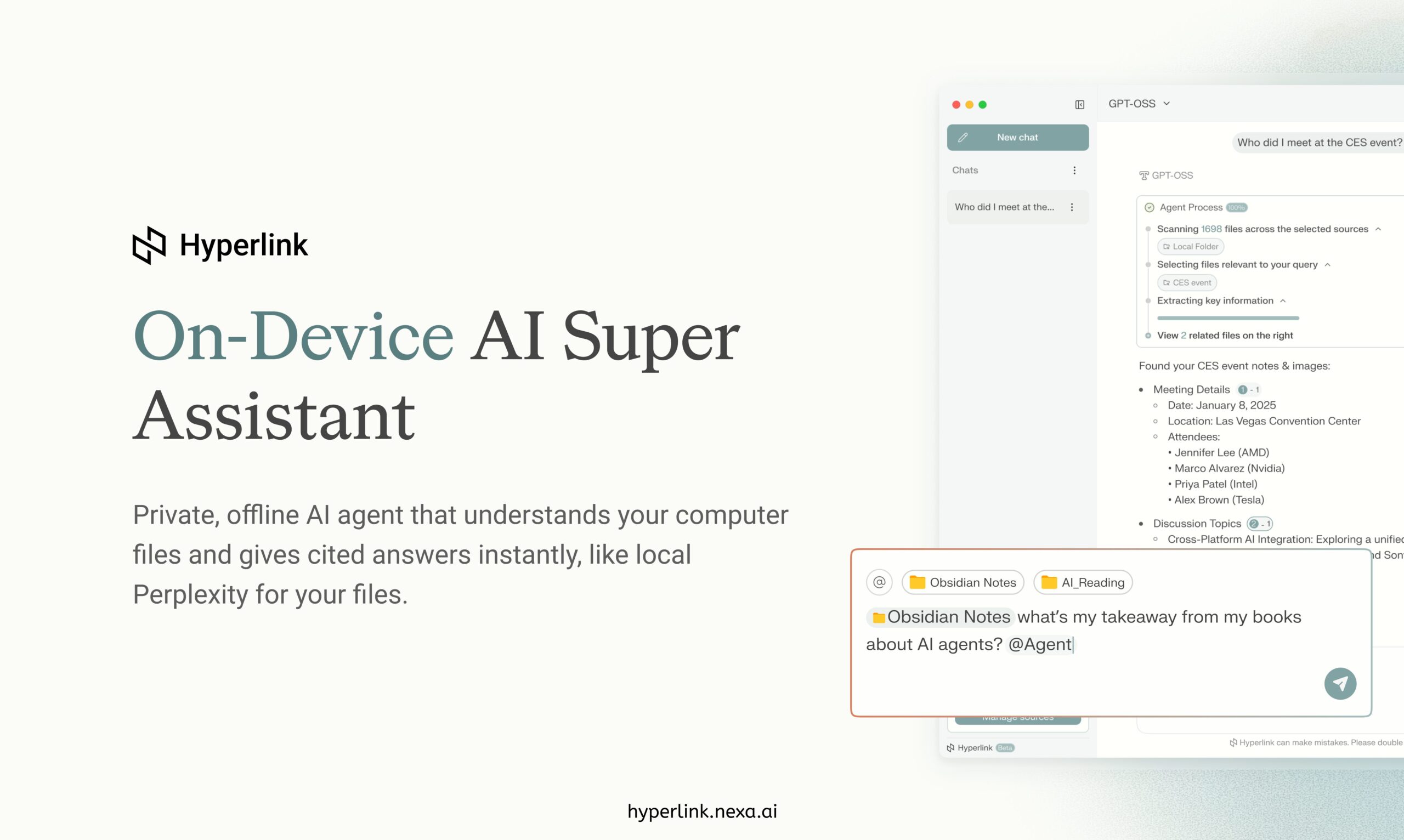
In an era where data privacy concerns intensify and cloud-dependent workflows fragment productivity, the concept of a fully local AI assistant operating entirely on your device represents a meaningful shift in personal AI architecture. Hyperlink by Nexa AI, launched publicly in November 2025 with RTX PC optimization, addresses this shift directly through a local-only AI agent that indexes and searches across all your personal files—documents, notes, images, presentations—without transmitting any data beyond your device. Rather than uploading sensitive information to cloud services for processing, Hyperlink runs entirely locally with open-source AI models, enabling semantic understanding of your complete file collection and providing cited answers directly from your personal archives. Unlike cloud-based search services, Hyperlink combines the natural-language Q&A experience users expect from modern AI with absolute data sovereignty—your AI truly stays on your machine.
Key Features
Hyperlink combines local AI processing with semantic search capabilities:
- 100% Local Processing: All AI operations execute directly on your device using locally-deployed open-source models. No data transmission to cloud services, no third-party access, no privacy tradeoffs—everything remains entirely under your control.
- Semantic File Search and Indexing: Advanced vector-based indexing creates searchable understanding of your complete file collection. Ask natural language questions and receive answers based on semantic meaning rather than keyword matching—”sci-fi themes” finds relevant content even in unrelated filenames.
-
Instant File/Document/Image Q&A: Query any file type—PDFs, Word documents, presentations, images, notes—and receive immediate answers with inline citations. Visual content (charts, screenshots, scanned documents) converts to queryable text through integrated OCR.
-
Contextual Source Citations: Every answer includes direct citations linking back to specific source files. Users can verify information, understand reasoning, and navigate to original documents instantly.
-
Model Flexibility and Selection: Choose from multiple open-source models (Gemma, Qwen, Llama, Granite, GPT-OSS) directly within Hyperlink, updating to newly released models on Day-1 availability. Switch models within single projects without rebuilding indexes.
-
Unlimited File Context: Unlike cloud services with token or file limitations, Hyperlink processes unlimited local files constrained only by device storage. Thousands of documents remain indexed and searchable simultaneously.
-
Agentic RAG (Retrieval-Augmented Generation): Advanced agent reasoning combines retrieval with step-by-step logic, enabling sophisticated multi-step analysis across your document collection and discovering connections humans might miss.
-
Multi-Device Sync: Automatically synchronize indexed files across your local devices without cloud intermediation. Files remain local; synchronization metadata coordinates search availability.
How It Works
Hyperlink operates through a streamlined local workflow:
Index Your Files: Designate folders or your entire drive for indexing. Hyperlink automatically builds a vector database of your files—extracting semantic meaning from documents, extracting text from images through OCR, and creating searchable representation of all content. The first index takes time proportional to file volume (approximately 4-5 minutes for 1GB on RTX-accelerated systems).
Ask Natural-Language Questions: Use the chat interface to ask questions about your files exactly as you would a search engine or conversational AI. “What were the key discussion points from my meeting last week?” or “Find all images of architecture from 2024” translate naturally into file search operations.
Receive Cited Answers: Hyperlink’s AI processes your question, searches the indexed collection, and provides direct answers with inline citations pointing to specific source files. Click citations to immediately open referenced documents.
Switch Models and Parameters: Access different open-source models through a simple dropdown, adjusting AI reasoning style or inference speed based on your needs. Models run locally; model switching doesn’t require internet access or cloud service integration.
Explore Cross-File Connections: Leverage agent reasoning to discover patterns and connections across your document collection. Hyperlink can summarize themes across multiple files, identify contradictions in different notes, or extract related information automatically.
Use Cases
Hyperlink serves scenarios requiring privacy, full-text search, and document intelligence:
- Confidential Research and Analysis: Researchers, lawyers, doctors, and security professionals maintain sensitive materials locally while gaining AI-powered search and analysis capabilities without cloud exposure or regulatory compliance complications.
-
Academic Research and Writing: Students and scholars search lecture notes, research papers, and previous assignments simultaneously, discovering how concepts interconnect across coursework without uploading university materials to external services.
-
Professional Knowledge Management: Professionals maintain searchable personal archives—email, meeting notes, project documentation, reference materials—as searchable knowledge bases without cloud synchronization or subscription fees.
-
Expense and Document Organization: Individuals automatically organize receipts, invoices, and financial documents, with AI extracting relevant information and completing categorization without external data transmission.
-
Rapid Problem-Solving and Debugging: Developers search across codebases, documentation, previous solutions, and code comments simultaneously to identify patterns and resolve issues faster.
-
Content Creation and Ideation: Writers and creators search personal notes, research, and inspiration sources simultaneously, discovering relevant ideas and connections for ongoing projects.
Pros & Cons
Advantages
- Absolute Privacy and Data Ownership: All processing occurs locally without any cloud transmission. Your personal files, conversations, and search history never leave your device—eliminating privacy tradeoffs inherent to cloud services.
-
Zero Subscription Required: Completely free for both personal and workspace use with no hidden features, premium tiers, or future paywall transitions planned. Download, install, and use immediately.
-
Unlimited File Context: No token limits, file caps, or arbitrary quotas constrain search. Index thousands of documents and search across your complete personal archive simultaneously.
-
Instant Citations and Verification: Every answer links directly to source files, enabling immediate verification and navigation to original context—eliminating the “hallucination” concerns of unsourced AI responses.
-
No Internet Dependency: Complete functionality without internet connectivity. Run Hyperlink on flights, in offline environments, or behind isolated networks without functionality restrictions.
-
Semantic Understanding Over Keywords: AI-powered semantic search finds relevant content based on meaning rather than keyword matching, enabling natural language queries that traditional file search cannot support.
-
Performance Acceleration Available: RTX PC optimization delivers 3x faster indexing and 2x faster inference for users with compatible hardware, compressing 1GB indexing from 15 minutes to 4-5 minutes.
Disadvantages
-
Device Storage Requirements: Indexing your complete file collection requires local storage. 1GB of documents generates additional index overhead; very large file collections require proportionally larger storage investment.
-
Single-Device Processing: Processing occurs only on your specific device. Multi-device synchronization requires separate indexing on each machine; search queries don’t cross-device from a single interface.
-
Local Hardware Constraints: Search and inference speed depend on your device’s CPU/GPU capabilities. Older or resource-constrained machines may experience slower responses compared to cloud services with unlimited compute.
-
Limited File Type Support: Currently supports documents (PDF, DOCX, Markdown, TXT), presentations (PPTX), and images (PNG, JPEG). Other file types (video, audio metadata, proprietary formats) lack full semantic indexing.
-
Initial Learning Curve: Semantic search requires different query patterns than traditional keyword-based file search. Users accustomed to finding files by name may require adjustment.
-
No Collaborative Features: Designed for individual privacy; lacks built-in team collaboration, shared canvases, or multi-user workspace management. Workplace teams require separate instances or manual coordination.
How Does It Compare?
Hyperlink operates in a fundamentally different category than traditional search and document management tools, emphasizing privacy and local processing over cloud convenience.
Perplexity AI provides conversational search across the internet with real-time citations and sophisticated Q&A. Perplexity excels at current events, research beyond personal files, and synthesizing information from diverse web sources. However, Perplexity operates entirely in the cloud; all queries and results flow through Perplexity’s servers. For users concerned with data privacy, Perplexity is unsuitable. Perplexity searches the web; Hyperlink searches your personal files. Perplexity requires internet; Hyperlink requires only local storage.
Raycast functions as a macOS productivity launcher and command palette, providing keyboard-driven access to applications, scripts, system controls, and integrations with Slack, GitHub, Jira, and other tools. While Raycast includes recent AI-assisted capabilities, it optimizes for application launching and workflow automation rather than semantic file search. Raycast accelerates access to external tools; Hyperlink accelerates understanding of personal files. Raycast provides shortcuts; Hyperlink provides knowledge management.
DEVONthink provides sophisticated document management with OCR, tagging, smart organization, and recent AI-assisted features including chat capabilities with uploaded documents. DEVONthink excels for professional document organization, email archiving, and PDF annotation. However, DEVONthink requires purchased licenses ($199+ for Pro) and operates as a document management platform requiring deliberate file import. Hyperlink automatically indexes your existing file collection without requiring reorganization or additional steps. DEVONthink is a purchased tool requiring manual file management; Hyperlink is free with automatic indexing.
Google Drive and Cloud Storage Search provides file search within cloud-hosted content but processes data on Google’s servers with inherent privacy implications. Cloud storage enables multi-device access at the cost of data sovereignty. Hyperlink trades multi-device convenience for complete local privacy.
Traditional File Search (macOS Spotlight, Windows File Explorer) provides keyword-based file search but lacks semantic understanding. Spotlight finds files by name or extension; Hyperlink finds files by meaning. Traditional search is faster for exact filename matching; Hyperlink excels at conceptual discovery.
Hyperlink’s distinctive positioning emerges through: 100% local privacy (no cloud transmission), semantic AI search (meaning-based discovery rather than keywords), zero subscription cost (free indefinitely), unlimited file context (no quotas or limitations), and complete data ownership (your files, your device, your choice). While cloud services offer multi-device convenience, global reach, and powerful computing, they require surrendering data sovereignty. Hyperlink optimizes for privacy and ownership at the cost of local-device-only processing.
Final Thoughts
Hyperlink represents a meaningful evolution in personal AI by demonstrating that sophisticated AI capabilities—semantic search, contextual understanding, cited reasoning—can operate entirely locally without compromising functionality. Its combination of free access, absolute privacy, semantic search across personal files, and zero subscription requirements creates genuine appeal for privacy-conscious professionals and individuals managing sensitive information.
For anyone with concerns about cloud privacy, those handling confidential materials (medical records, legal documents, financial information), individuals in restrictive regulatory environments, or simply those preferring complete data sovereignty, Hyperlink offers compelling functionality. The cost is local-device dependency and manual multi-device coordination—tradeoffs that become advantages when privacy is paramount.
For users requiring multi-device access, collaboration features, or search across web-based information (Perplexity’s domain), traditional cloud services remain more appropriate. Hyperlink optimizes specifically for the privacy-first, locally-processing use case rather than attempting universal functionality.
https://hyperlink.nexa.ai/