
Table of Contents
Overview
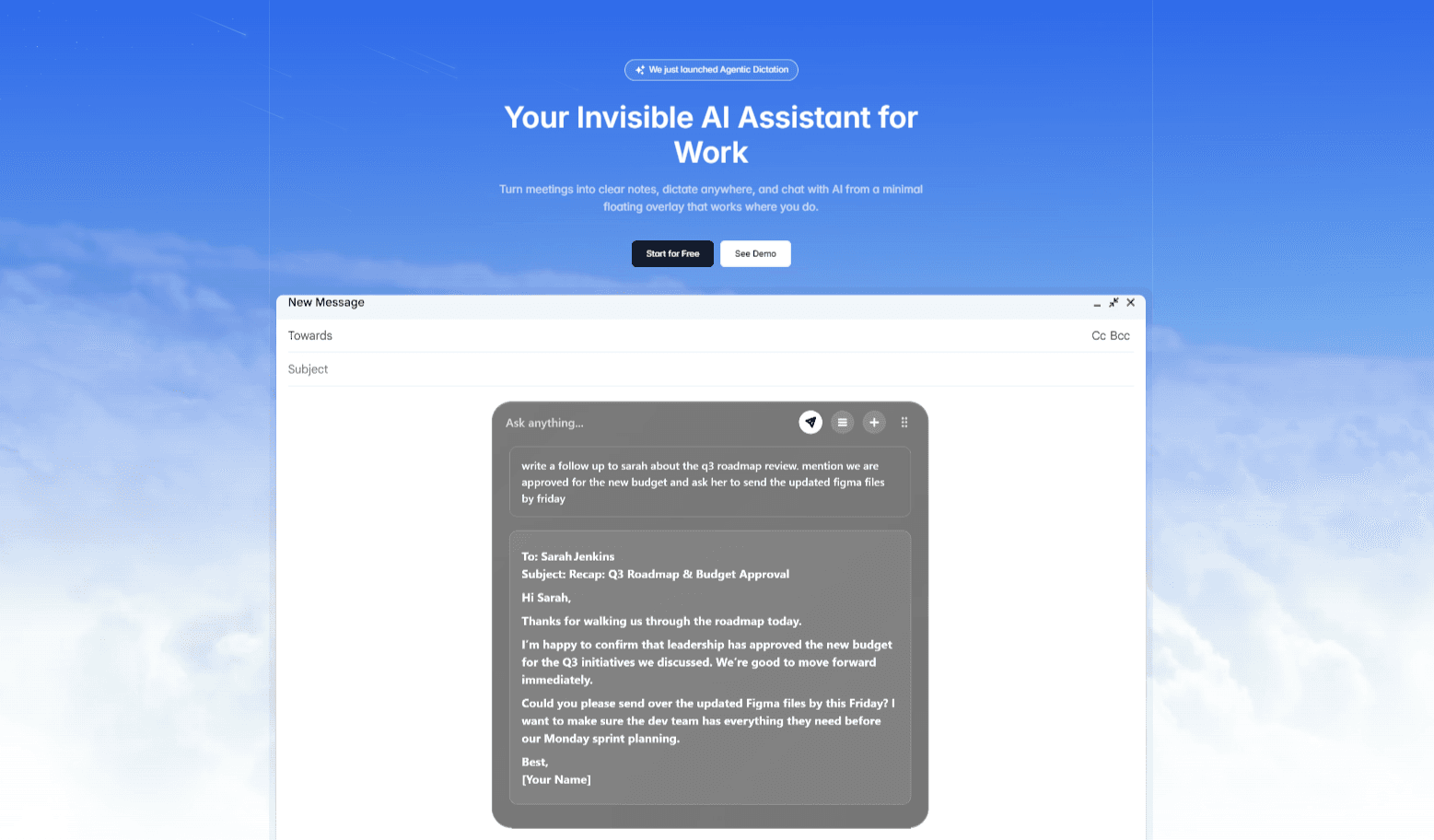
Notto is a desktop-native AI assistant designed to eliminate the friction of switching between apps during work. Functioning as a minimal, invisible overlay, it sits on top of your existing software stack—whether you are in Zoom, Slack, or Google Docs—to provide instant intelligence. It unifies three critical workflows into one tool: an automatic meeting notetaker, a system-wide voice dictation tool, and a floating chat interface. By remaining “invisible” until needed, Notto allows users to maintain their flow state while ensuring every meeting detail and idea is captured effortlessly.
Key Features
Notto replaces multiple standalone tools with a single “invisible” layer:
- Floating AI Overlay: A minimal interface that appears only when summoned, working over your apps so you never lose context of your current task.
- Meeting Copilot: Automatically records and transcribes meetings from any platform (Zoom, Teams, Meet) without a bot joining the call, generating clean summaries and to-do lists.
- Universal Dictation: A “speech-to-text” engine that works in any text box (email, IDE, CRM), allowing you to speak complex thoughts and have them typed instantly in perfect format.
- Contextual Chat: Ask questions about your current meeting or past notes directly from the overlay without leaving your current window.
- Privacy-First Design: Features like “Ghost Mode” ensure the overlay remains invisible to others during screen sharing.
Use Cases
This tool is optimized for professionals who need speed and focus:
- Hands-Free Documentation: Dictating long emails or memos while walking around the room, with the AI handling punctuation and formatting.
- Meeting Focus: Engaging fully in client calls without worrying about taking notes, knowing the AI is capturing action items in the background.
- Instant Retrieval: Quickly verifying “what was the budget we agreed on?” mid-conversation without digging through folders.
Pros & Cons
A balanced look at the tool’s strengths and limitations.
Advantages
- Frictionless Flow: The overlay design prevents the cognitive load of “tab switching,” keeping you focused on your primary work.
- Versatility: It combines the features of a dictation tool (like Dragon) and a meeting recorder (like Otter) in one.
- Zero-Setup: Works with any meeting platform immediately since it records system audio; no integrations or bots required.
Disadvantages
- Early Stage: Some advanced features like “Instant Recall” (Chat with Notes) are currently marked as “coming soon” or in beta.
- Desktop Only: As a system overlay, it requires a desktop environment (Mac/Windows) and does not have a mobile counterpart for on-the-go recording.
How Does It Compare?
Notto creates a new category by combining dictation and transcription. Here is how it compares:
- Vs. Otter.ai / Fireflies.ai:
These tools are “Bot-First.” They join your meetings as a visible participant (“OtterPilot”), which can feel intrusive to clients. They also live in a web dashboard, requiring you to switch tabs to see notes. Notto is “Client-Side.” It records what you hear invisibly, without a bot, and keeps the transcript floating right on your screen. - Vs. Superwhisper:
Superwhisper is a fantastic tool dedicated solely to dictation (voice-to-text) on Mac. While excellent for writing, it does not record long meetings or generate summaries. Notto includes similar dictation capabilities but adds the full “Meeting Recorder” suite, making it a broader productivity tool. - Vs. Granola:
Granola is a meeting notepad that requires you to actively take notes to help the AI. Notto is more passive; it captures everything for you, allowing you to be completely hands-off, though Granola may offer more structured control for power users.
Final Thoughts
Notto is the ideal solution for the “busy generalist”—founders, product managers, and executives—who bounce between meetings, emails, and deep work. By removing the barrier of “opening a tool” to use AI, it encourages more frequent usage. While it is still evolving, its “invisible layer” approach represents the future of how we will interact with AI: not as a destination we visit, but as a utility that is always there.
Disclaimer: This analysis is based on information available as of January 2026. Features like “Instant Recall” are in active development; please check the official website for the latest release status.