
Table of Contents
RenameClick
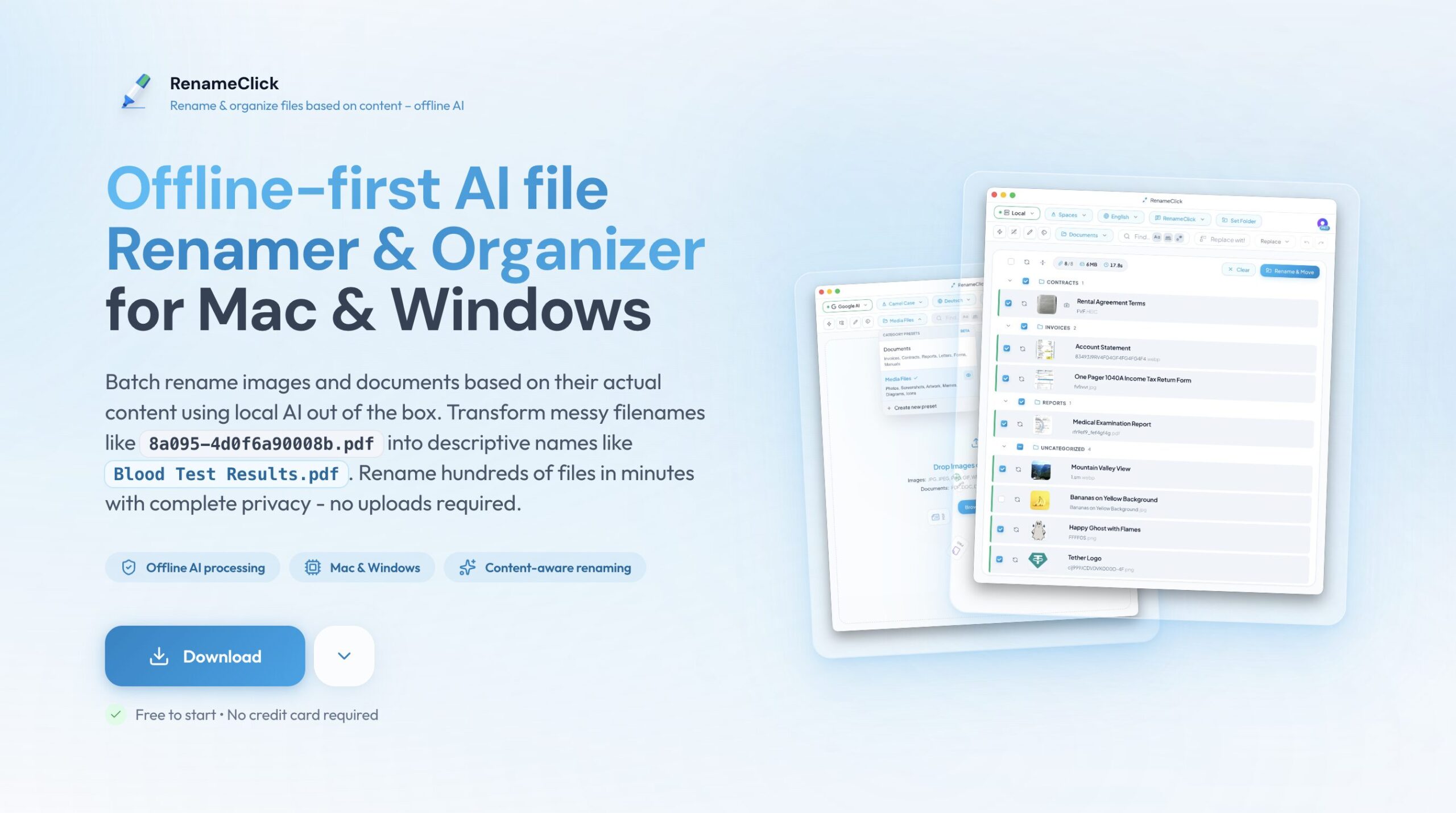
RenameClick is an offline-first AI utility that transforms chaotic file folders into organized archives without compromising privacy. By running local Large Language Models (LLMs) directly on your device, it analyzes the actual content of documents and images to generate descriptive filenames and sort them into logical directories—all without uploading a single byte to the cloud.
What It Does
Unlike traditional renamers that rely on rigid patterns or metadata (like dates), RenameClick “reads” your files. It opens PDFs, images, and text documents, understands what they contain (e.g., “Invoice for Consulting from Acme Corp”), and renames them according to your instructions. It then acts as an automated filing clerk, moving these files into categorized subfolders based on their content.
Because it runs locally, it is particularly suited for handling sensitive documents like financial records, legal contracts, or personal photos where cloud upload is a security risk.
Core Features
Offline-First AI Processing: Uses embedded local models (optimized for performance) to analyze files entirely on your machine. No internet connection is required for the core functionality.
Content-Based Renaming: The AI generates names based on actual file content, not just existing filenames. It can identify invoice numbers, event locations in photos, or document summaries.
Smart File Organization: Automatically sorts files into folder structures defined by presets. You can create custom categories (e.g., “Taxes,” “Receipts,” “Contracts”), and the AI determines where each file belongs.
Customizable Presets & Prompts: Comes with ready-to-use presets for immediate value but allows deep customization. Users can write natural language instructions (prompts) to dictate exactly how files should be named (e.g., “Format as YYYY-MM-DD – [Client Name] – [Type]”).
Metadata & EXIF Support: Combines AI analysis with hard metadata. You can inject specific EXIF data (like dates or camera models) into the AI-generated names using placeholders.
Flexible Model Choice: While it works out of the box with the bundled local model, power users can connect to external local servers like LM Studio/Ollama or cloud APIs if they prefer specific models.
How It Works
- Select Folder: Drag and drop a folder containing mixed files.
- Choose Preset: Select a built-in preset or a custom one you’ve created.
- Local Analysis: The tool scans each file’s content locally.
- Preview & Apply: Review the proposed names and folder destinations in a batch list. Click to apply changes, and the tool renames and moves the files instantly.
Ideal Use Cases
Digital Cleanup: Organizing a massive “Downloads” folder into clean categories like “Installers,” “Documents,” and “Images.”
Photo Management: Sorting thousands of photos by content (e.g., “Beach Vacation,” “Family,” “Pets”) without relying solely on obscure filenames like IMG_9823.JPG.
Admin & Finance: Standardizing filenames for invoices and receipts by extracting dates and vendor names for easier accounting.
Strengths and Considerations
Strengths: Complete privacy (zero data upload). No subscription fatigue (lifetime option available). Highly customizable with natural language prompts. Bridges the gap between rigid automation tools and intelligent manual sorting.
Considerations: Performance depends heavily on your hardware; older machines without dedicated GPUs will process files slower than cloud solutions. Initial download size is larger due to bundled AI models. No built-in cloud sync features (files are organized locally).
Pricing
Free Tier: Unlimited file analysis with 30 rename/move credits per month. Ideal for testing the workflow.
Pro Monthly: $12/month (often discounted to $8). Unlocks unlimited processing and all AI features.
Pro Lifetime: $48 one-time payment. Grants unlimited access forever, including future updates.
How Does It Compare?
Nexa AI File Organizer: A direct competitor also focusing on local-first, private file organization. Nexa AI often emphasizes “set and forget” background automation, whereas RenameClick offers more granular control over the renaming prompts and batch review process.
Renamer.ai: A cloud-based alternative. While powerful and often faster because it leverages server-side GPUs, it requires uploading files. This makes it less suitable for sensitive data compared to RenameClick’s offline approach, but potentially better for users with low-spec hardware.
Hazel: The gold standard for Mac automation. Hazel relies on strict “if this, then that” rules (e.g., “if extension is PDF, move to folder”). It is incredibly reliable for predictable workflows but lacks the “intelligence” to understand file content without explicit rule setup. RenameClick is better for “messy” folders where rules are hard to define.
A Better Finder Rename: A classic power-user tool for pattern-based renaming (regex, text replacement). It is unmatched for speed and complex string manipulation but cannot “read” a PDF to find an invoice number like RenameClick can.
FileBot: The specialist for media files. If your goal is strictly organizing movies and TV shows, FileBot is superior due to its specialized database connections (TheMovieDB, TVDB). RenameClick is a generalist better suited for documents, photos, and mixed work files.
Final Thoughts
RenameClick effectively fills the “privacy gap” in AI productivity tools. While cloud-based AI tools are powerful, many users are rightfully hesitant to upload their entire “Documents” folder to a remote server just to get it organized. By bringing the LLM to the data rather than sending data to the LLM, RenameClick offers a secure, modern solution for digital hoarding. It is an excellent upgrade for users who find Hazel too complex to configure or A Better Finder Rename too limited for content-based organization. The lifetime pricing model also makes it an attractive alternative to the subscription-heavy software market.