
Table of Contents
Voice Anywhere
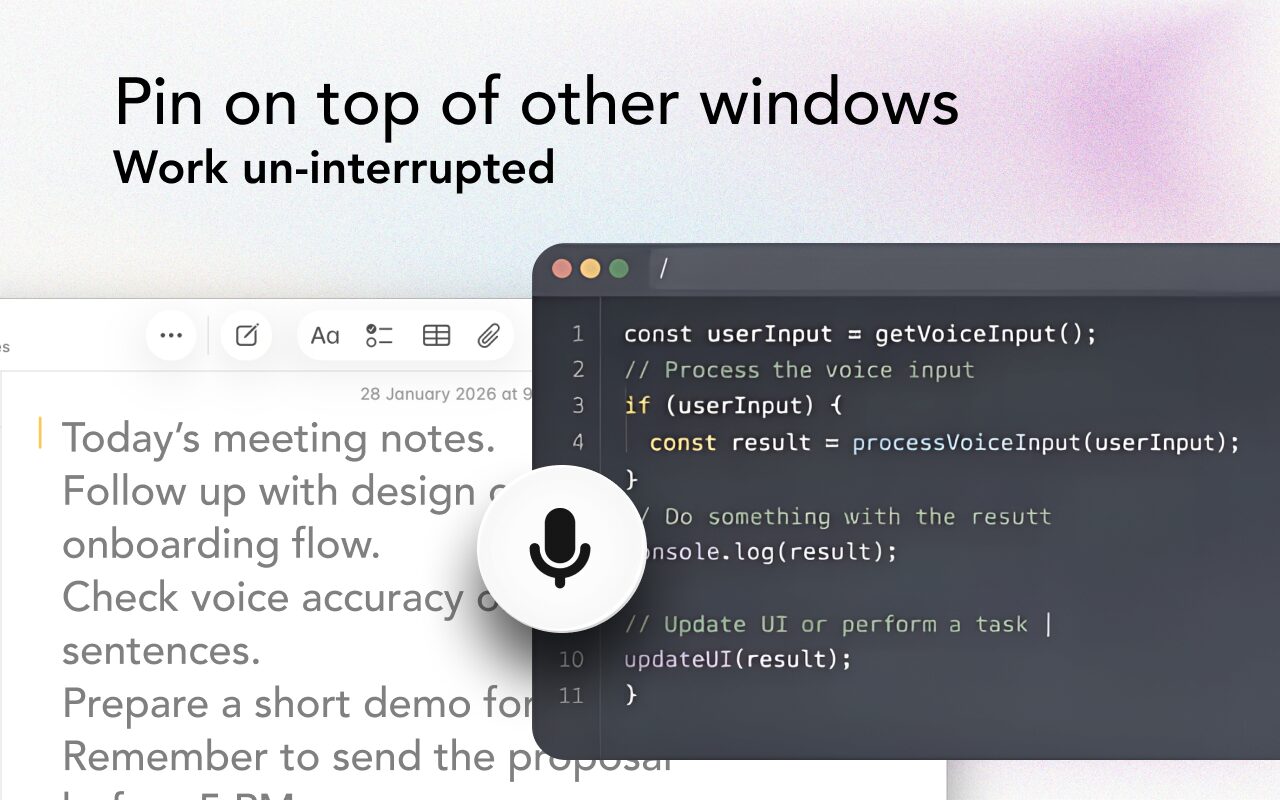
Voice Anywhere is a lightweight macOS utility designed to bring seamless speech-to-text dictation to every text field on a Mac. It uses a “floating mic” interface that stays pinned on top of other windows, allowing users to dictate directly into IDEs like VS Code, web browsers, or Slack without switching apps. It primarily leverages Apple’s native on-device speech engine for zero-latency privacy but offers cloud fallbacks for expanded language support.
Core Features
- Floating Glass Interface: A minimalist, “always-on-top” microphone button (designed with SwiftUI “Liquid Glass” aesthetics) that hovers over your active window for instant access.
- Universal Text Injection: Emulates keyboard input to type transcribed text into any active cursor field, bypassing the need for app-specific plugins.
- Hybrid Speech Engine: Defaults to Apple On-Device Speech Recognition for fast, private, offline dictation; switches to encrypted cloud processing for languages not supported locally.
- Instant Toggle: Activated via a clickable floating button or the global hotkey SHIFT + R.
- Multilingual Support: Supports 70+ languages (often cited as 100+ including dialects) with the ability to switch input languages on the fly.
How It Works
Once installed on macOS (optimized for macOS Tahoe), the app renders a small floating microphone on the screen. The user places their cursor in any text field—a Python script, a Tweet, or a Notion doc—and hits SHIFT + R (or clicks the mic). They speak naturally, and the app converts the audio to text in real-time, “typing” it out as if the user were typing on a keyboard.
Use Cases
- “Vibe Coding”: Developers can dictate comments, documentation, or simple logic directly into VS Code or Xcode without taking their hands off the mouse.
- Rapid Communication: Replying to Slack messages or emails while multitasking in other windows.
- Accessibility: A lightweight alternative for users with RSI (Repetitive Strain Injury) who need to reduce keystrokes but find full voice control suites too complex.
- Multilingual Drafting: Quickly dictating a paragraph in Spanish or Japanese into a non-native English interface.
Pros & Cons
- Pros: Zero-UI friction (no need to copy-paste from a separate dictation window); Privacy-first default (uses local macOS engine); One-time purchase availability (avoids subscription fatigue); Native aesthetics that blend perfectly with macOS design language.
- Cons: macOS Exclusive (no Windows/Linux version); Limited by Apple’s Engine (offline accuracy for technical jargon is lower than Whisper-based cloud tools); No Voice Commands (purely dictation—you can’t say “open Chrome” or “delete line,” unlike Dragon or Talon); Requires macOS Tahoe for the latest UI features.
Pricing
- Free Trial: 7-day full access.
- Monthly: $4.99/month.
- Annual: $29.99/year.
- Lifetime: Often available as a one-time purchase (check app store for current offer, typically ~$50-60 range).
How Does It Compare?
Voice Anywhere is a “micro-tool” for dictation, whereas its competitors are often full “voice control” suites.
- macOS Built-in Dictation (Fn-Fn)
The biggest competitor is free. You can already press F5 or Fn-Fn to dictate on a Mac. Voice Anywhere differentiates itself with the floating UI (visual cue of status), faster toggle (single key vs double tap), and better language switching logic. Native dictation also often times out; Voice Anywhere is designed for longer “bursts.” - Superwhisper
The current “gold standard” for AI dictation on Mac. Superwhisper uses OpenAI’s Whisper model locally, which is significantly more accurate than Apple’s native engine (especially for accents and code). However, Superwhisper is more resource-intensive. Voice Anywhere is lighter but potentially less accurate for complex technical terms unless utilizing its cloud fallback. -
Nuance Dragon Professional
The enterprise heavyweight. Dragon is full voice control (editing, formatting, navigating). Voice Anywhere is just dictation. If you need to write a legal brief hands-free, get Dragon. If you just want to dictate a Slack reply, Voice Anywhere is 10x cheaper and simpler. -
Talon Voice
The coder’s choice. Talon allows you to write complex code and control your entire OS with voice commands (“eye tracking + noise”). It has a steep learning curve. Voice Anywhere has zero learning curve but cannot “control” your computer—it only types what you say.
Final Thoughts
Voice Anywhere is a “quality of life” utility rather than a revolutionary AI platform. It solves a specific annoyance: “I want to talk to my computer without opening a special app.” It is perfect for “casual” dictation—founders, managers, and writers who want to speed up email replies. Serious developers needing full voice coding should look at Talon; users needing perfect transcription accuracy should look at Superwhisper; but for a native, lightweight feel, Voice Anywhere is a solid choice.