
Table of Contents
Overview
Adobe Premiere Pro has long been a powerhouse in the video editing world, and its latest iteration, version 25.2, takes things to a whole new level. This update isn’t just about incremental improvements; it’s a leap forward powered by the magic of artificial intelligence. With features like Generative Extend, AI Media Intelligence, and auto caption translation, Premiere Pro 25.2 promises to revolutionize post-production workflows. Let’s dive into what makes this update a game-changer for video editors.
Key Features
Premiere Pro 25.2 is packed with features designed to streamline your editing process and unlock new creative possibilities. Here’s a breakdown of the key highlights:
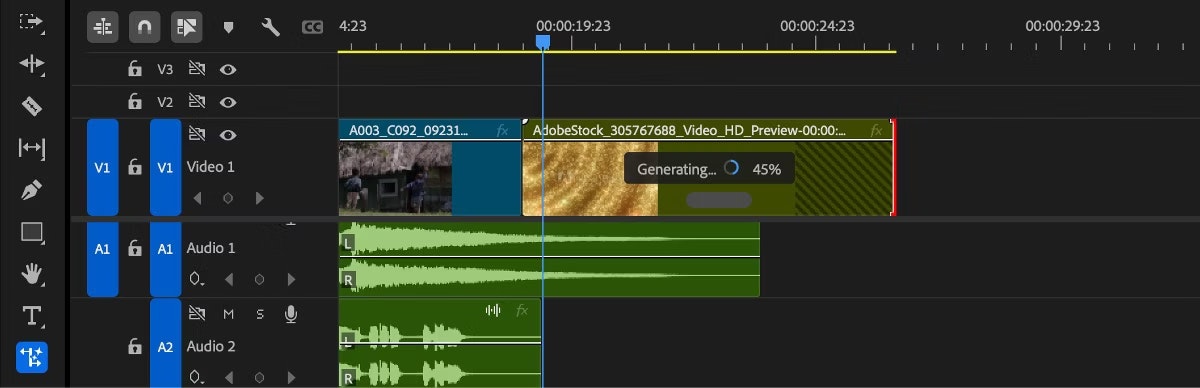
- Generative Extend: Seamlessly extend your clips using the power of Adobe Firefly. This AI-driven feature synthesizes new content to fill gaps, allowing you to lengthen scenes without the need for reshoots.
- AI Media Intelligence: Say goodbye to endless scrolling through footage. This feature intelligently tags and indexes your media, making it easier than ever to find the perfect shot.
- Auto Caption Translation: Reach a global audience with ease. Automatically translate captions into multiple languages, saving you time and resources on localization.
- Enhanced Color Tools: Fine-tune your visuals with improved color management tools, ensuring your videos look their best across different devices and platforms.
- Faster Export and Rendering: Get your projects out the door faster with optimized export and rendering performance.
How It Works
The AI enhancements in Premiere Pro 25.2 are seamlessly integrated into the editing workflow. You can access these features directly from the Premiere Pro timeline. Generative Extend, for instance, allows you to select a clip and use Adobe Firefly to generate content that extends the scene beyond its original boundaries. AI Media Intelligence works in the background, automatically analyzing and tagging your footage for easy searching. Auto caption translation is similarly straightforward, allowing you to quickly translate captions into various languages with just a few clicks.
Use Cases
The new AI features in Premiere Pro 25.2 open up a wide range of possibilities for video editors. Here are a few key use cases:
- Extending scene length without reshooting: Need a few extra seconds to build tension? Generative Extend lets you seamlessly add content to your clips.
- Fast content localization: Reach a global audience by automatically translating captions into multiple languages.
- Searching large video libraries: Quickly find the perfect shot with AI-powered media tagging and indexing.
- Streamlined editing workflows: Automate repetitive tasks and focus on the creative aspects of editing.
- Efficient captioning for global reach: Create and translate captions with ease, making your content accessible to a wider audience.
Pros & Cons
Like any powerful tool, Premiere Pro 25.2 has its strengths and weaknesses. Let’s take a look at the pros and cons:
Advantages
- Boosts productivity by automating repetitive tasks.
- Reduces editing time with AI-powered features.
- Enables localization for a global audience.
- Improves media organization with intelligent tagging.
Disadvantages
- Demands high computing power for optimal performance.
- AI results may vary depending on the complexity of the footage.
- Learning curve for mastering the new AI tools.
How Does It Compare?
When it comes to video editing software, Premiere Pro isn’t the only player in the game. Here’s how it stacks up against some of its competitors:
- Final Cut Pro: While Final Cut Pro offers a smooth editing experience, particularly for Mac users, it lags behind Premiere Pro in terms of AI-powered features.
- DaVinci Resolve: DaVinci Resolve is renowned for its superior color grading tools, but it has a steeper learning curve compared to Premiere Pro.
- CapCut: CapCut is a more basic, mobile-focused video editing app, making it suitable for quick edits on the go but lacking the advanced features of Premiere Pro.
Final Thoughts
Adobe Premiere Pro 25.2 is a significant update that leverages the power of AI to enhance the video editing experience. While it may require a powerful computer and some time to learn the new features, the potential benefits in terms of productivity and creative possibilities are undeniable. If you’re looking to streamline your workflow and unlock new levels of efficiency, Premiere Pro 25.2 is definitely worth considering.
https://helpx.adobe.com/premiere-pro/using/whats-new/2025-2.html