

Table of Contents
Overview
Aiarty Video Enhancer is an offline desktop application from Digiarty Software (est. 2006) that combines diffusion- and GAN-based AI models to upscale, denoise, deblur, interpolate frames, and clean audio—all on local hardware for maximum privacy. With GPU acceleration (NVIDIA, AMD, Apple Silicon) it turns SD or HD footage into natural-looking 4 K and up to 120 fps. A free license is available at launch (Windows: FEXEZ-GSQN3-6CDVA-BJBBS / Mac: FFXOC-PTZTJ-AYMFH-QSTZV) and processes clips up to 120 seconds without watermarks.
Key Features
- AI-powered upscaling to 4 K: Increases resolution up to 4× while restoring realistic detail.
- AI image sharpening: Recovers edge definition and fine textures without halo artifacts.
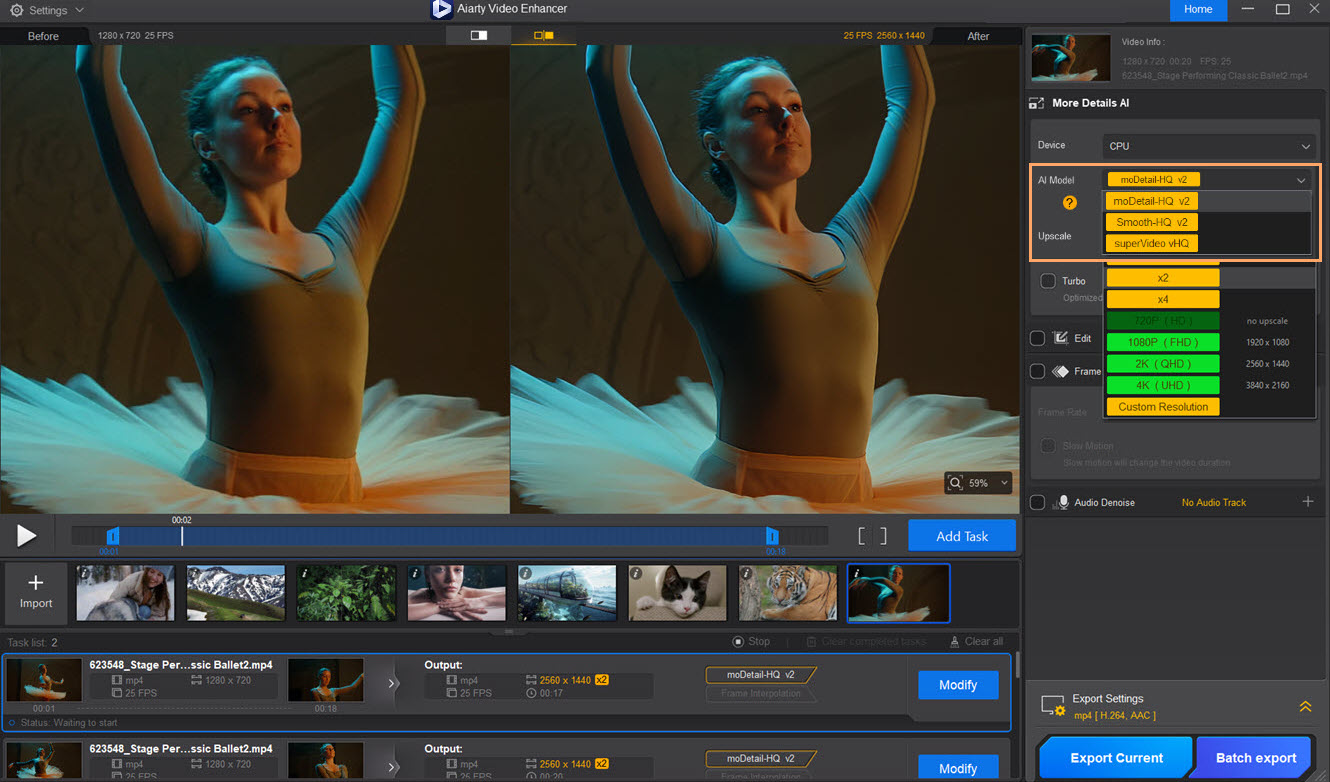
- AI denoising \& deblurring: Removes high-ISO grain and motion blur using moDetail-HQ v2, Smooth-HQ v2, and superVideo vHQ models.
- AI frame interpolation: Generates new frames for fluid slow-motion or conversion to 60 / 90 / 120 fps.
- AI audio denoise: Reduces wind, hum, and mic hiss to match the improved picture quality.
- Offline, GPU-accelerated workflow: Runs entirely on Windows 10 (1809+) or macOS 10.15+, leveraging CUDA, Metal, or HIP for up to 95% GPU utilization.
How It Works
- Import one or more clips (MP4, MOV, AVI, MKV, etc.).
- Choose an AI model—moDetail-HQ for details, Smooth-HQ for balanced enhancement, or superVideo vHQ for heavy denoise.
- Set options for resolution, frame interpolation, audio cleanup, and export codec (H.264/H.265/ProRes).
- Preview the before/after split view, adjust if needed, then launch processing.
- Aiarty analyzes each frame locally, applies the selected model, and writes a new video with preserved color and metadata.
Use Cases
- Restoring home movies captured on DV or early smartphones.
- Polishing YouTube or TikTok content before upload to improve retention.
- Clarifying CCTV footage for investigative review.
- Preparing archival assets for modern streaming services.
- Creating cinematic slow-motion from standard-speed sports or wildlife clips.
Pros \& Cons
Advantages
- High-quality 4 K upscaling with realistic textures.
- Three specialized AI models bundled in one app.
- Audio and video enhancement in a single pass.
- Fully offline processing protects sensitive footage.
- Free license code for testing all core functions.
Disadvantages
- GPU-intensive workloads; older laptops render slowly.
- Free license limited to 120-second clips per export.
- Turbo mode requires RTX 3000-series / M1 Pro or newer to reach real-time speeds.
How Does It Compare?
| Feature | Aiarty Video Enhancer | Topaz Video AI 5.1 | AVCLabs Video AI 4 | HitPaw Video Enhancer 2.8 |
|---|---|---|---|---|
| Price (perpetual) | Lifetime \$149 (launch-30% off) | \$299 (1-yr upgrades) | \$199 | \$79 |
| Offline processing | Yes | Yes | Yes | Yes |
| Upscale limit | 4 K | 8 K | 8 K | 4 K |
| Frame interpolation | 120 fps | 200 fps | 60 fps | 60 fps |
| Audio denoise | Built-in | No | Yes | No |
| GPU optimization | NVIDIA/AMD/Apple | NVIDIA only | NVIDIA only | NVIDIA/AMD |
| Learning curve | Beginner-friendly | Moderate | Beginner | Beginner |
Aiarty undercuts Topaz on price and offers integrated audio cleanup; it also provides more hands-on controls than AVCLabs and faster GPU utilization than HitPaw on high-end cards. Topaz still leads for 8 K workflows, while Aiarty excels at all-in-one enhancement and privacy-focused offline processing.
Final Thoughts
Aiarty Video Enhancer delivers an impressive blend of AI upscaling, denoise, deblur, frame interpolation, and audio cleanup inside a streamlined offline application. Backed by Digiarty’s long software track record and real-time GPU acceleration, it is a compelling option for creators who need 4 K output without cloud dependencies or high subscription costs. While demanding hardware is required for fastest renders, the free license and intuitive workflow make it easy to test Aiarty’s capabilities and decide if its hybrid AI models suit your production needs.