
Table of Contents
Zush
The AI File Organizer for macOS
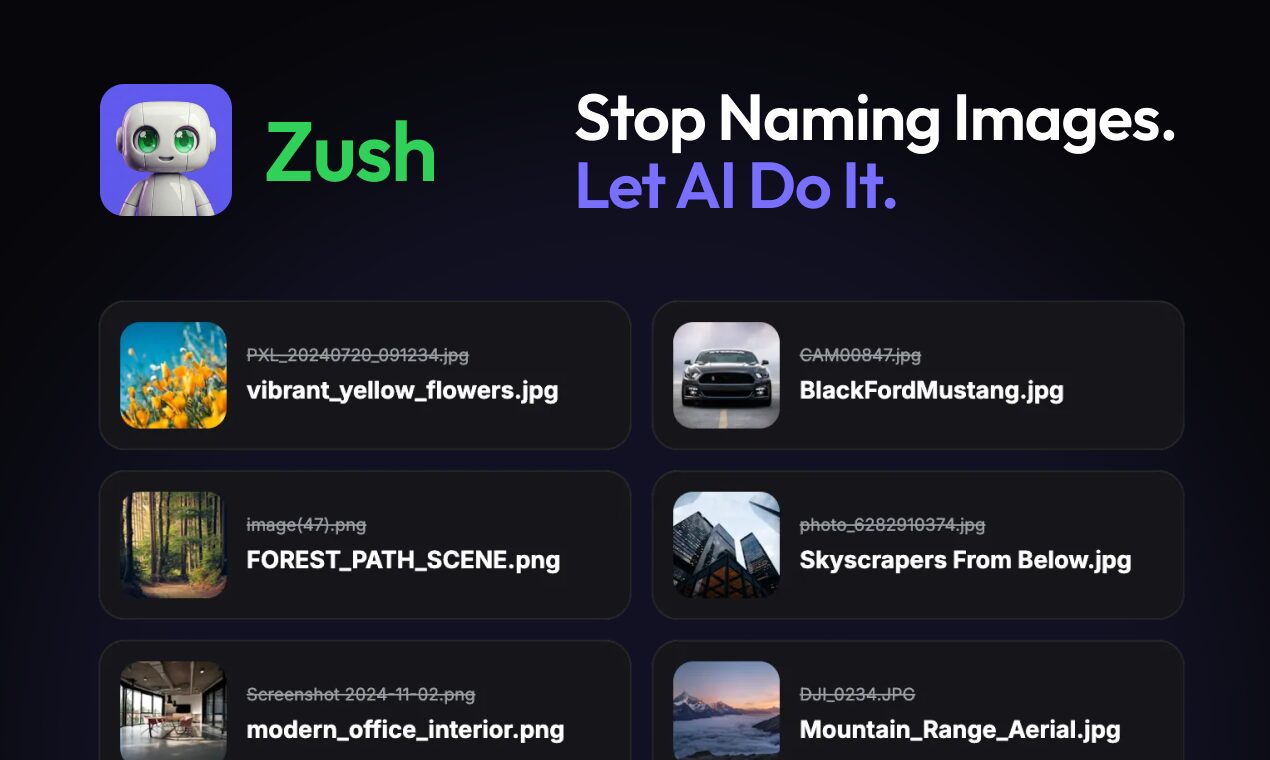
Zush is a native macOS utility that ends the chaos of messy download folders and image libraries. Instead of manually renaming files from “IMG_1234.jpg” to “Mountain_Sunset.jpg,” Zush uses local AI to “see” your images and rename them with descriptive, searchable keywords automatically. It works in two ways: a Batch Mode for instantly cleaning up thousands of old photos, and an Auto-Pilot Mode that watches specific folders 24/7 to rename and tag new files the moment they land on your Mac. Built entirely in Swift, it is a tiny (14MB) but powerful tool that brings order to your file system without sending your photos to the cloud.
Key Features
- AI Visual Recognition: The app analyzes the actual content of the image (objects, colors, scenes) to generate accurate filenames.
- 24/7 Folder Watch: “Auto-pilot” monitors folders (like Downloads or Screenshots); as soon as a file is saved, it is renamed and tagged instantly.
- Finder Native: Integrates directly with macOS Tags, making your images searchable via Spotlight without needing a separate library app.
- Professional RAW Support: Works with standard formats (JPG, PNG) and professional camera RAW files (CR2, NEF, ARW) used by photographers.
- Privacy First: All AI processing happens locally on your Mac’s Neural Engine—no images are ever uploaded to a server.
User Workflow
- Select: Drag a folder of messy images into Zush.
- Configure: Choose a naming pattern (e.g.,
{Date}_{AI_Description}_{Sequence}). - Process: Click “Rename,” and the AI updates the filenames in Finder immediately.
Use Cases
- Photography Portfolios: Quickly converting raw camera uploads into client-ready filenames (e.g., “Wedding_Bride_Smile.jpg”).
- Design Asset Management: Organizing stock photos and textures so they can be found via Spotlight search.
- SEO Preparation: Renaming images before uploading them to a website to ensure better search engine ranking.
- Download Folder Cleanup: Automatically sorting and tagging random internet downloads as they happen.
Pros & Cons
- Pros: Runs 100% locally (private & fast), lightweight native app (not an Electron web wrapper), innovative “Auto-pilot” feature.
- Cons: macOS only (no Windows version), AI processing is slower than simple text replacement, “generative” naming can sometimes be unpredictable.
Pricing
- Freemium: Free download with basic limits.
- Pro Upgrade: One-time purchase for unlimited batch processing and auto-pilot monitoring.
How Does It Compare?
vs. A Better Finder Rename (ABFR)
ABFR is the industry standard for rule-based renaming. If you need to “Replace text ‘A’ with ‘B'” or “Add Date to suffix,” ABFR is faster and more precise. Zush is for content-based renaming. You use Zush when you don’t know what the file contains and need the AI to describe it for you.
vs. Excire / Peakto
Excire and Peakto are full Digital Asset Management (DAM) software. They build massive databases to index your photos. Zush is a lightweight utility. It doesn’t create a library; it just fixes the filenames in Finder. Use Excire if you have 100,000 photos to browse; use Zush if you just want your folders to be tidy.
vs. File Renamer AI (Web)
There are web-based AI renamers, but they require uploading your files, which is slow and a privacy risk. Zush runs natively on-device, making it faster for large RAW files and secure for sensitive personal photos.
Final Thoughts
Zush solves a problem that regular “batch renamers” cannot: it understands what your files are, not just what they are called. For designers, social media managers, and photographers who waste hours manually typing descriptions for files, Zush acts as an “always-on” librarian that keeps your Mac organized automatically. It is a perfect example of how small, local AI models can improve daily OS utility.